Introduction
Campus compliance teams are under growing pressure: OCR complaint filings against higher education institutions have climbed steadily, and the DOJ's 2024 Title II rule now sets a firm deadline. Starting April 2026, public colleges and universities must meet WCAG 2.1 Level AA standards for all web content and mobile applications—or face enforcement action.
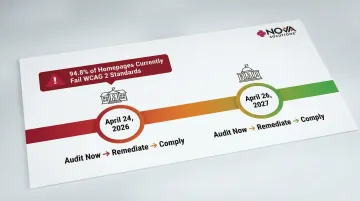
The gap between where most institutions stand and where they need to be is significant. WebAIM's 2025 Million Report found that 94.8% of homepages fail WCAG 2 standards, averaging 51 errors per page. For students with disabilities, those errors aren't statistics—they're blocked course registration pages, inaccessible syllabi, and classroom environments that weren't designed with them in mind.
This guide covers the governing laws—ADA Title II and Section 504—and explains what compliance looks like for both digital and physical environments. You'll find a breakdown of the 2026 regulatory updates and a practical roadmap for getting your campus on track.
Key Takeaways
- Public institutions must comply with ADA Title II; any institution receiving federal funding falls under Section 504
- Compliance covers both digital accessibility (websites, apps, course materials) and physical spaces (buildings, labs, accessible workstations)
- The 2024 DOJ rule sets WCAG 2.1 AA deadlines: April 24, 2026 for larger institutions; April 26, 2027 for smaller ones
- Non-compliance risks OCR complaints, federal lawsuits, and loss of federal funding
The Legal Framework: ADA, Title II, and Section 504
The Americans with Disabilities Act of 1990 (ADA) prohibits discrimination based on disability across all programs, services, and activities of qualifying institutions. Which specific law governs your institution depends on whether it's public or private.
Which Law Applies to Your Institution
- Public colleges and universities fall under Title II of the ADA as state or local government entities
- Private institutions receiving federal funding are bound by Section 504 of the Rehabilitation Act of 1973, not Title III
- Section 504 in practice: Any federally funded postsecondary institution—virtually all accredited colleges—must not exclude or discriminate against students with disabilities, and must provide effective auxiliary aids and services at no cost to the student
Enforcement
The U.S. Department of Education's Office for Civil Rights (OCR) enforces both laws, investigating complaints and mandating corrective action. OCR can suspend or terminate federal financial assistance if institutions refuse to comply, or refer cases to the DOJ for judicial enforcement.
Coverage extends beyond students. Faculty, staff, job applicants, and members of the public accessing campus programs or services all fall within ADA's scope.
What ADA Compliance Covers in Higher Education
ADA compliance in higher education spans two distinct domains: digital accessibility and physical/built environment accessibility. Each carries its own technical requirements, and gaps in either can expose institutions to legal liability.
Digital Accessibility
Digital compliance requires websites, online learning platforms, course registration systems, financial aid portals, mobile apps, and digital course materials to be accessible to users with visual, auditory, motor, and cognitive disabilities.
WCAG 2.1 Level AA is the technical standard institutions must meet. Core requirements include:
- Alt text for images
- Captions for videos
- Keyboard-navigable interfaces
- Screen reader compatibility
Institutions are also responsible for externally contracted platforms — LMS vendors, third-party apps, and licensed tools. The DOJ rule explicitly states that public entities must ensure accessibility for content provided "directly or through contractual, licensing, or other arrangements." Accessibility requirements should be written into procurement contracts before a vendor is selected.
Physical Accessibility
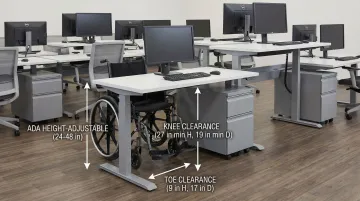
Physical ADA compliance requirements include accessible routes, ramps, door widths, restrooms, signage, parking, and—critically for higher ed—accessible classroom and computer lab spaces where students interact with technology.
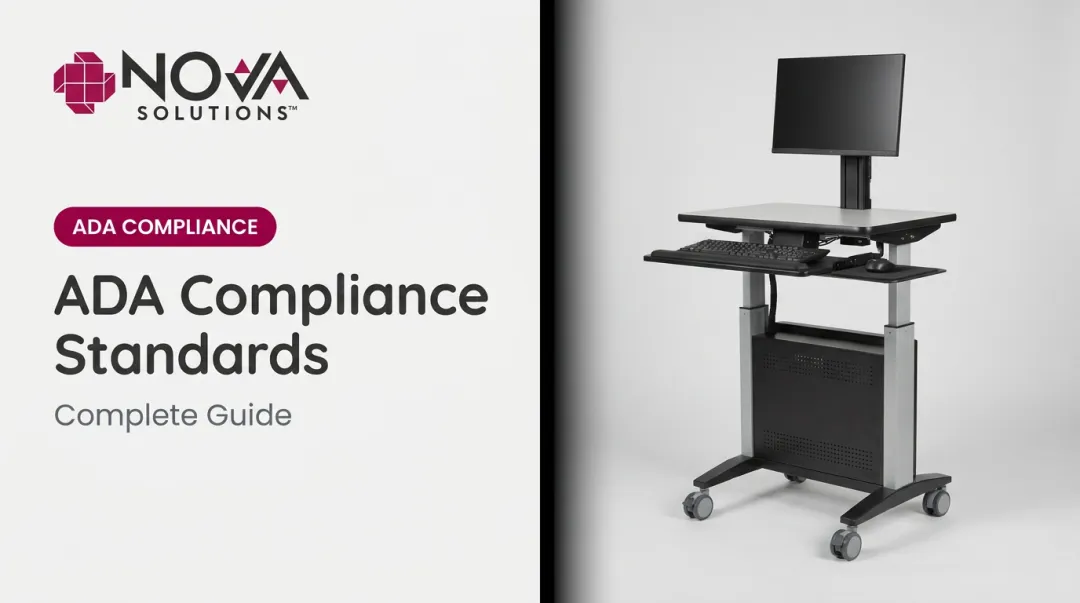
The 2010 ADA Standards require at least 5% of work surfaces (including computer labs) to provide 28–34 inch surface heights with specific knee and toe clearances. Institutions outfitting new or renovated spaces must ensure height-adjustable computer desks and accessible workstations satisfy these dimensions. NOVA Solutions manufactures ADA-compliant computer training desks and sit-stand lecterns built to these specifications for educational environments.
Auxiliary Aids and Services
Beyond physical spaces and digital platforms, institutions must also provide auxiliary aids and services — tools and accommodations that enable equal participation for students with disabilities. These include:
- Captioning and sign language interpreters
- Screen readers and Braille materials
- Notetakers and assistive listening devices
Students must self-identify and request accommodations. Once a request is made, institutions must respond in a timely manner and cannot require students to pay for required academic aids.
The 2026 ADA Title II Updates: What Higher Ed Needs to Know
In 2024, the DOJ finalized a rule under Title II explicitly requiring state and local government entities—including public colleges and universities—to conform all web content and mobile applications to WCAG 2.1 Level AA.
Compliance Deadlines
- April 24, 2026: Public entities with populations of 50,000 or more
- April 26, 2027: Public entities with populations under 50,000 and all special district governments
What's In Scope
All public-facing and internal-use digital content, including:
- Course portals and event pages
- Student services systems
- Faculty-published materials
- Mobile apps used for campus functions
Limited Exceptions
- Archived content not updated since a specific cutoff date
- Content from third parties not under the institution's control
- Content raising a fundamental alteration or undue burden (must be documented)
Why Acting Now Matters
WebAIM's 2025 research shows that 94.8% of homepages fail WCAG 2 standards — a figure that signals most institutions have real ground to cover before April 2026. With audits, remediation, and staff training all requiring lead time, waiting until the final months is a risk few campuses can afford.
Who Is Responsible for ADA Compliance on Campus?
The ADA/504 Coordinator: Federal law requires institutions with 15 or more employees to designate at least one person responsible for coordinating compliance efforts. Key duties include:
- Handling student accommodation requests
- Overseeing grievance procedures
- Ensuring institutional policies are followed
That coordinator role sets the foundation — but responsibility doesn't stop there. Every department that creates, procures, or manages content and environments plays a part.
Shared Departmental Responsibility:
- IT and web teams: Conduct digital audits and lead remediation efforts
- Faculty and instructional designers: Develop and maintain accessible course materials
- HR and administrative offices: Ensure employment-related documents and processes meet accessibility standards
- Facilities teams: Manage physical environment compliance, from ramps to furniture clearances
When these roles are clearly defined and coordinated, institutions can catch compliance gaps before they become complaints — or lawsuits.
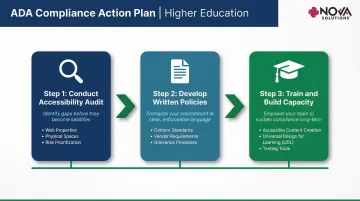
Building an ADA Compliance Action Plan
Step 1: Conduct an Accessibility Audit
Start by taking full stock of what you have:
- Inventory all web properties, apps, and documents for WCAG 2.1 AA conformance
- Assess physical spaces against ADA Standards for Accessible Design
- Prioritize findings by risk level — legal exposure first, then user impact
Note that automated tools cannot detect all WCAG failures — manual evaluation by a knowledgeable reviewer is required for full compliance.
Step 2: Develop and Enforce Written Accessibility Policies
Establish clear policies covering:
- Content creation standards
- Vendor procurement requirements
- Accommodation request procedures
- Grievance processes
- Assigned timelines and named accountability owners for remediation
Step 3: Invest in Training and Capacity Building
Provide faculty, IT staff, and administrators with ongoing training on:
- Accessible content creation
- Universal design for learning (UDL)
- Use of accessibility testing tools
Institutions that build accessibility into everyday workflows — procurement, content publishing, space planning — stay ahead of compliance gaps rather than scrambling to close them after a complaint.
Frequently Asked Questions
Do colleges and universities have to be ADA compliant?
Yes. Public institutions are covered under ADA Title II, and any institution receiving federal financial assistance falls under Section 504 of the Rehabilitation Act. Virtually all accredited colleges are legally required to comply.
What are the ADA changes for 2026 that affect higher education?
The DOJ's 2024 final rule under Title II now explicitly requires public higher ed institutions to meet WCAG 2.1 Level AA for all web content and mobile applications. Compliance deadlines are tiered: April 24, 2026, for larger institutions and April 26, 2027, for smaller ones.
What does an ADA coordinator do?
The ADA/504 Coordinator is the designated institutional point of contact responsible for overseeing compliance, managing accommodation requests, handling grievances, and ensuring the institution meets its obligations under both the ADA and Section 504.
Do web requirements differ for public vs. private institutions?
Yes — but both face binding obligations. Public institutions must meet WCAG 2.1 AA under the 2024 DOJ Title II rule. Private colleges receiving federal funding face equivalent web accessibility requirements under Section 504, enforced through OCR.
What are the consequences if a website is not ADA compliant?
Institutions risk OCR complaints, DOJ enforcement actions, federal civil rights lawsuits, and loss of federal funding. Beyond legal exposure, inaccessible websites actively prevent students with disabilities from participating in academic life on equal terms.
How do I make a syllabus ADA compliant for higher education?
Use proper heading structure, provide text descriptions for any images or charts, and ensure linked documents are in accessible formats. Include a clear disability accommodation statement with contact information for the institution's ADA coordinator.