Introduction
The Americans with Disabilities Act governs two very different types of spaces — and most businesses need to think about both.
Physical compliance covers door widths, parking ratios, ramp slopes, and work surface heights. Digital compliance covers whether your website can be navigated by someone using a screen reader or keyboard alone. Neither is optional — and enforcement on both fronts is active, not theoretical.
According to UsableNet's 2025 Year-End Digital Accessibility Lawsuit Report, 5,114 digital accessibility lawsuits were filed in 2025 across federal and state courts alone.
Physical facility violations carry their own weight: DOJ complaints and civil actions with penalty ceilings that have risen sharply in recent years.
This guide covers both tracks: who must comply, what the physical standards actually require (with specific dimensions), how web accessibility works, and the practical steps that reduce your exposure — whether you're outfitting a training room or auditing a website.
Key Takeaways
- The ADA prohibits disability-based discrimination and applies to physical facilities and digital properties
- Physical standards (2010 ADA Standards) cover routes, parking, work surfaces, and restrooms with precise dimensional requirements
- Websites must be accessible under Title III; courts consistently use WCAG 2.1 Level AA as the benchmark
- In 2025, 5,114 digital accessibility lawsuits were filed; 70% involved eCommerce sites
- First-time ADA Title III civil penalties now reach $118,225, making proactive compliance far cheaper than litigation
What Is ADA Compliance and Who Must Follow It
Signed on July 26, 1990, and significantly amended by the ADA Amendments Act of 2008 (effective January 1, 2009), the ADA is a federal civil rights law that prohibits discrimination based on disability across five areas:
| ADA Title | Coverage Area |
|---|---|
| Title I | Employment |
| Title II | State and local government |
| Title III | Public accommodations and commercial facilities |
| Title IV | Telecommunications |
| Title V | Miscellaneous provisions |
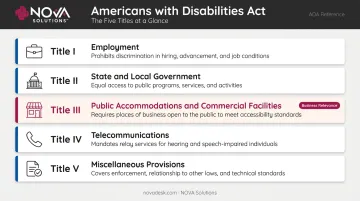
For most businesses, Title III is the most consequential. It covers any private entity that owns, leases, or operates a place of public accommodation — retail, restaurants, healthcare, education, banking, hospitality, and more.
Who Actually Has to Comply
Coverage depends on title — and the thresholds are different enough to catch many organizations off guard:
- Title I (employment) applies to employers with 15 or more employees
- Title III (public accommodations) has no employee-count threshold — it applies based on whether you operate a place of public accommodation, period
A small conference center, training facility, or nonprofit venue with fewer than 15 staff can still face full Title III obligations for both its physical spaces and its website.
That scope grew considerably after Congress acted in 2008.
How the 2008 Amendments Broadened the Definition of Disability
The ADAAA broadened the definition of "disability" in three important ways:
- Major life activities now explicitly include breathing, learning, concentrating, reading, and communicating
- Major bodily functions — including neurological, digestive, respiratory, and immune system functions — are covered
- Episodic conditions (such as epilepsy or cancer in remission) count if they would substantially limit a major life activity when active
For training facilities, government offices, and educational institutions in particular, this means a wider range of users now have enforceable accommodation rights — making proactive design choices far less costly than reactive retrofits.
Key Physical ADA Compliance Standards for Buildings and Workspaces
All covered new construction and alterations starting on or after March 15, 2012 must comply with the 2010 ADA Standards for Accessible Design. The 1991 standards are no longer the reference point.
Accessible Routes and Entrances
- At least 60% of all public entrances must comply with door requirements (Section 206.4.1)
- Door openings require 32 inches minimum clear width (Section 404.2.3) — distinct from the 36-inch minimum required for accessible walking routes (Section 403.5.1)
- Ramps must have a running slope no steeper than 1:12 (Section 405.2)
- Accessible routes must connect parking areas to entrances and all primary function areas
Parking and Loading Zones
Table 208.2 sets specific accessible parking minimums based on lot size. Key thresholds include:
- 1–25 total spaces: 1 accessible space required
- For every 6 accessible spaces, at least 1 must be van-accessible (Section 208.2.4)
- Van spaces require 98 inches minimum vertical clearance (Section 502.5)
- Access aisles must extend the full length of the parking space
Work Surfaces, Dining Surfaces, and Built-In Elements
Section 226.1 of the 2010 Standards establishes that where dining or work surfaces are provided, at least 5% (but not fewer than 1) must be accessible.
Accessible surfaces must meet:
- Surface height: 28–34 inches above finish floor (Section 902.3)
- Knee clearance height: 27 inches minimum (Section 306)
- Knee clearance depth: 8 inches minimum at 27 inches above floor
- Knee clearance width: 30 inches minimum
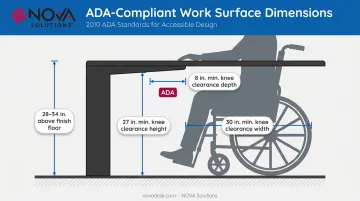
This applies directly to conference rooms, training facilities, computer labs, and corporate learning environments — not just restaurants.
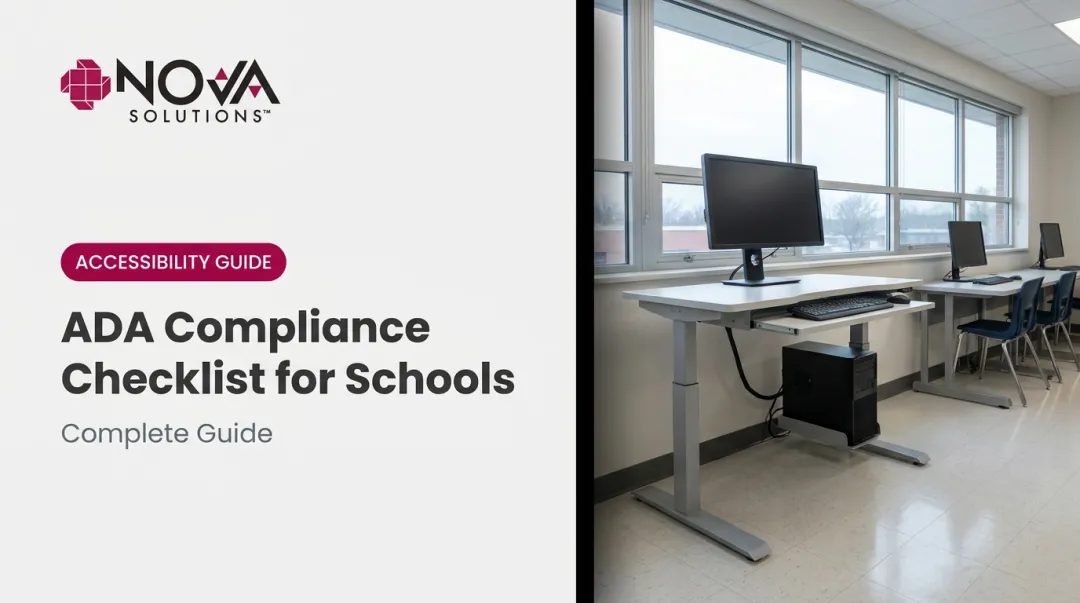
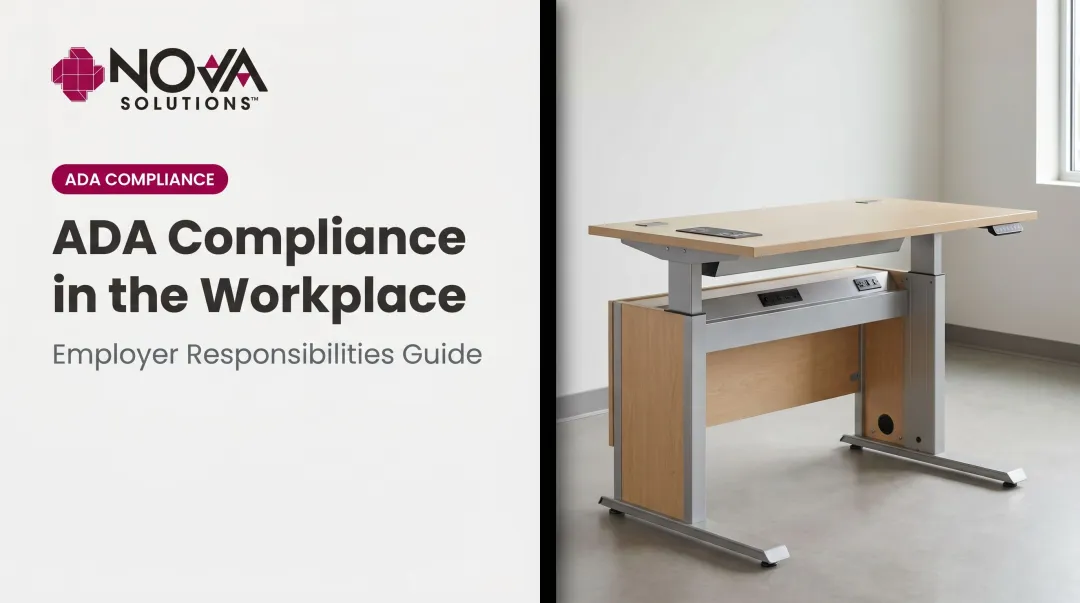
For organizations outfitting these spaces, NOVA Solutions manufactures ADA-compliant computer training desks and tables with a 32-inch ADA height option, knee clearance specifications that meet Section 306 requirements, and electric sit-stand configurations that adjust from 30 to 42 inches — all built into the product at the factory.
NOVA's GSA Contract GS-28F-005GA (Office Furniture, SIN 33721) simplifies procurement for federal agencies and educational institutions purchasing through government channels.
Restrooms
Key dimensional requirements under the 2010 Standards:
- Water closet centerline: 16–18 inches from the side wall (Section 604.2)
- Side wall grab bar: 42 inches minimum length (Section 604.5.1)
- Rear wall grab bar: 36 inches minimum length (Section 604.5.2)
- Lavatory rim height: 34 inches maximum above finish floor (Section 606.3)
- Minimum clearance: 60 inches perpendicular to the side wall
ADA Compliance for Websites and Digital Accessibility
The original 1990 ADA made no mention of websites — they didn't exist yet. But DOJ guidance has consistently extended ADA obligations to digital properties. The DOJ's 2022 web accessibility guidance explicitly states that state and local governments and businesses open to the public must make their websites accessible to people with disabilities.
In Robles v. Domino's Pizza (2019), the Ninth Circuit confirmed that the ADA applies to websites and apps that connect customers to goods and services offered at physical locations. That ruling made one thing clear: digital accessibility is a legal requirement, not a best practice.
What "Accessible" Means in Practice
Web accessibility means your site can be used by people who rely on:
- Screen readers (visual disabilities)
- Keyboard-only navigation (motor disabilities)
- Captions and transcripts (hearing disabilities)
- Readable contrast and scalable text (cognitive and visual disabilities)
The WCAG Framework as the De Facto Standard
WCAG (Web Content Accessibility Guidelines) is a technical standard developed by the W3C — not a law. But it's what courts and DOJ resolutions use to evaluate whether a website is accessible.
The framework is organized around four POUR principles:
- Perceivable — information must be available in formats users can actually access (text alternatives, captions, adaptable layouts)
- Operable — all functions must work via keyboard, not just a mouse, with sufficient time and no seizure-triggering content
- Understandable — language, navigation, and error messages must be clear and predictable
- Robust — content must be compatible with current and future assistive technologies, including screen readers
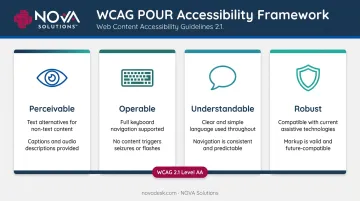
WCAG defines three conformance levels: A (minimum), AA (the legal benchmark), and AAA (enhanced). WCAG 2.1 Level AA is required for state and local government web content under DOJ's 2024 Title II rule, and it's the standard referenced in most federal court decisions and DOJ settlements involving Title III businesses.
WCAG 2.2 is the latest W3C-published version, but WCAG 2.1 AA remains the current U.S. legal baseline.
Key WCAG 2.1 AA Requirements
The most commonly cited accessibility failures — and what the standard requires:
| Requirement | WCAG Criterion | Level |
|---|---|---|
| Alt text for all non-text content | SC 1.1.1 | A |
| Captions for prerecorded video | SC 1.2.2 | A |
| Color contrast ratio of at least 4.5:1 | SC 1.4.3 | AA |
| Text resizable to 200% without loss of function | SC 1.4.4 | AA |
| All functionality operable by keyboard | SC 2.1.1 | A |
What Digital Content Is Covered
ADA digital compliance extends beyond websites. Covered content includes:
- Mobile apps
- PDFs and web-based documents
- Online forms and registration systems
- Video content
- eCommerce checkout and transaction workflows
eCommerce sites face the sharpest legal exposure. UsableNet's 2025 report found that 70% of all digital accessibility lawsuits involved eCommerce sites.
ADA vs. WCAG: Understanding the Difference
These two terms get conflated constantly. They're not the same thing, and the distinction matters legally.
| ADA | WCAG | |
|---|---|---|
| Type | Federal civil rights law | Technical guidelines |
| Created by | U.S. Congress | W3C (international standards body) |
| Enforced by | DOJ + private plaintiffs | No inherent legal enforcement |
| Penalties | Civil penalties, damages, equitable relief | None (guidelines only) |
| Applies to | All covered entities | Anyone who chooses to adopt it |
The relationship is straightforward: the ADA says websites cannot discriminate against users with disabilities. WCAG 2.1 Level AA defines the technical criteria that, if met, demonstrates you've complied with that obligation.
One Critical Misconception
ADA compliance is not a one-time certification — a point that catches many organizations off guard.
Physical construction standards apply at the time of construction or alteration. Once a building is built to spec, it's compliant until altered. Websites work differently. They change constantly: new pages launch, forms get updated, videos are added, third-party plugins get swapped out. Each change can introduce new barriers.
DOJ's 2018 letter to Congress made clear that the absence of a specific web accessibility regulation does not excuse noncompliance with ADA obligations. Organizations need ongoing monitoring, not a one-time audit.
Consequences of Non-Compliance and How to Stay Protected
The Current Litigation Landscape
The numbers have grown year over year:
- 5,114 total digital accessibility lawsuits reviewed in 2025 (3,195 federal + 1,919 state)
- 4,669 total in 2024 — meaning 2025 represented continued growth
- 8,667 federal ADA Title III lawsuits filed in 2025 across all categories (Seyfarth 2026 report), with website cases accounting for 36% of that total
- 70% of digital accessibility suits involved eCommerce
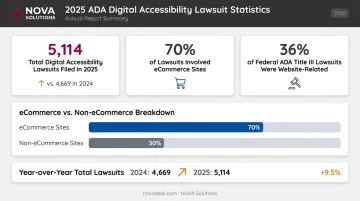
For physical violations, the DOJ can investigate complaints, initiate civil actions, and award damages. Current civil penalties under 28 CFR 85.5 (effective July 3, 2025):
- First violation: $118,225
- Subsequent violations: $236,451
These figures are adjusted annually for inflation.
Four Practical Steps to Reduce Exposure
- Conduct a baseline audit — a physical facility review against the 2010 ADA Standards and a digital audit against WCAG 2.1 AA using automated tools plus manual testing
- Prioritize and remediate gaps — focus first on high-traffic areas and transaction-critical workflows (checkout, forms, registration)
- Document your efforts — maintain records of audits, remediation logs, training, and policies; documented good-faith efforts matter if a complaint arises
- Establish a maintenance cadence — websites and facilities change; compliance requires regular re-evaluation, not a single project
On the physical side, step one pays the biggest dividend: specifying ADA-compliant furniture upfront costs far less than retrofitting after the fact. NOVA Solutions' training desks, conference tables, and AV lecterns ship fully assembled with ADA-compliant dimensions built in — surface heights, knee clearance, and toe clearance meet the 2010 Standards straight out of the box.
For government and institutional buyers, NOVA's GSA contract (GS-28F-005GA) simplifies procurement and automatically creates a documented paper trail — useful evidence of good-faith compliance efforts if a complaint ever arises.
Frequently Asked Questions
What is considered a violation of the ADA?
An ADA violation occurs when a covered entity fails to provide equal access or reasonable accommodations to a person with a disability. Common examples include inaccessible building entrances, websites screen readers cannot navigate, and missing accessible parking or restroom facilities.
What's the difference between ADA and WCAG?
The ADA is a U.S. civil rights law that prohibits disability-based discrimination — it's enforceable by the DOJ and through private lawsuits. WCAG is a set of technical web accessibility guidelines developed by the W3C. Courts use WCAG 2.1 Level AA as the practical measure of whether a website meets ADA obligations.
Which websites need to be ADA compliant?
Any website operated by a state or local government, a business with 15 or more employees, or any place of public accommodation (retail, healthcare, education, hospitality, etc.) must be accessible. DOJ guidance confirms this applies regardless of whether the business has a physical storefront.
Is it illegal to not have an ADA compliant website?
Courts have consistently ruled that inaccessible websites violate Title III of the ADA, even though the law predates the web. Businesses face lawsuits, demand letters, and monetary settlements for maintaining websites that users with disabilities cannot access effectively.
What are the ADA accessibility requirements for websites?
The ADA doesn't specify technical requirements, but the DOJ consistently references WCAG 2.1 Level AA. Key requirements include:
- Alt text for images and keyboard navigation for all functions
- Color contrast of at least 4.5:1 and captions for prerecorded video
- Forms with clear error identification
What documentation is needed for ADA compliance?
Maintain an accessibility policy, audit records, remediation logs, and staff training documentation. For physical facilities, keep construction or alteration permits showing compliance with the 2010 ADA Standards — this demonstrates good-faith effort if a complaint arises.