Desk height is a performance variable. Set it wrong and you're working against your own body on every click, every keypress, every aim correction. Set it right and the whole setup disappears — your hands just do what your brain tells them to.
There's no single magic number that works for everyone. The correct desk height is calculated from your body, not pulled from a spec sheet. This guide covers the right range, how to calculate it for your height, why it matters for competitive play, and how to set it up precisely — including for team facilities managing multiple players at once.
Key Takeaways
- For most seated players of average height, the target range is 28–30 inches (71–76 cm) — but your body measurements matter more than any fixed number.
- Elbows should sit at 90–110 degrees, forearms parallel to the desk, shoulders completely relaxed.
- A desk set too high causes shoulder tension and unstable aim; too low rounds the spine and accelerates wrist fatigue.
- Height-adjustable desks are essential in shared training facilities, where multiple players of different sizes use the same stations.
- FPS and MOBA players have different movement demands — the same ergonomic setup principles apply to both.
The Right Esports Desk Height: Numbers That Actually Work
The Starting Range
Cornell's ergonomics guidelines put the standard computer workstation desk height at 28–30 inches (71–76 cm) as suitable for most adults. That range exists because most commercially manufactured chairs and desks happen to align within it — not because it's universally optimal.
Treat 28–30 inches as a starting point, not a final answer. Your actual correct height is wherever your forearms rest parallel to the desk surface with your elbows bent at 90–110 degrees and your shoulders fully relaxed. OSHA's computer workstation guidance puts it simply: the keyboard and work surface should be at approximately elbow height, with forearms roughly parallel to the floor.
Height Reference Table
Use this as a quick starting estimate. Always verify with the elbow-angle check described in the setup section below.
| Player Height | Recommended Desk Height |
|---|---|
| Under 5'4" (163 cm) | 24–26 in (61–66 cm) |
| 5'4"–5'7" (163–170 cm) | 26–28 in (66–71 cm) |
| 5'8"–5'10" (173–178 cm) | 27–29 in (69–74 cm) |
| 5'11"–6'1" (180–185 cm) | 28–30 in (71–76 cm) |
| 6'2"+ (188 cm+) | 30–33 in (76–84 cm) |
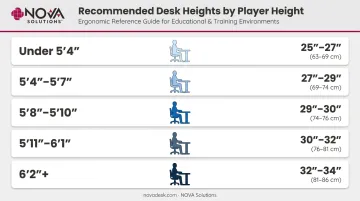
These ranges are derived from seated elbow-height calculations, not arbitrary standards. Use them to narrow your starting point, then fine-tune.
The Chair-Desk Relationship
Desk height can't be set in isolation — the chair has to come first. Sit with your feet flat on the floor and your thighs parallel to the ground. Once the chair is adjusted, the desk height follows to meet your arms — not the other way around.
Adjusting only one without rechecking the other creates a cascading misalignment. A chair set too low with a fixed desk forces you to raise your arms to reach the surface. A chair set too high with the same desk pushes your knees up and shifts your center of gravity forward.
No single static height is ideal for hours of continuous play. Holding any one posture for extended periods — even a technically correct one — builds fatigue. That's the practical case for height-adjustable desks in competitive environments.
Why Desk Height Directly Affects Esports Performance
Most players think about aim in terms of sensitivity settings and crosshair placement. The biomechanics of the arm doing the actual moving get less attention — which is exactly where desk height comes in.
What Happens When the Desk Is Too High
When the desk sits above your natural elbow height, your shoulder has to rise slightly to meet it. That means the upper trapezius — the muscle primarily responsible for scapular elevation — carries a low-level static load for the entire session.
Research on computer workers found that workstation setup predicted trapezius activity better than task duration alone — with model fits explaining 48–55% of median trapezius activity variance.
For FPS players on low-sensitivity settings who rely on broad arm sweeps, this matters. Shoulder tension introduces micro-instability into every mouse movement, and after an hour, that tension compounds into noticeably less fluid aim.
What Happens When the Desk Is Too Low
A desk set too low pulls the spine into a forward-rounded posture. The forearms lose full surface contact, and the wrist has to compensate by bending upward to reach the mouse and keyboard. OSHA notes that contact stress at the desk edge can restrict blood flow to the forearms — and the CCOHS confirms that resting wrists against a hard edge can impede circulation to and from the hand.
Over a long session, reduced forearm contact and poor wrist angle translate directly to slower, less precise movement as physical fatigue builds in the wrong muscles.
Muscle Memory and Height Consistency
When you practice at a consistent desk height, your nervous system maps the exact arm trajectory for every action. The surface height becomes part of that learned movement pattern — how far your arm extends, how it tracks, where it lands.
Switch to a different station and even a modest height change disrupts that pattern. Common situations where this hits:
- Tournament venues with standardized (often non-adjustable) desk heights
- Team facilities that haven't matched your personal setup
- A friend's rig during casual practice
Pro players often describe feeling "off" on unfamiliar setups. That feeling is real — and height is one of the first variables to check.
Step-by-Step: How to Set Your Esports Desk to the Right Height
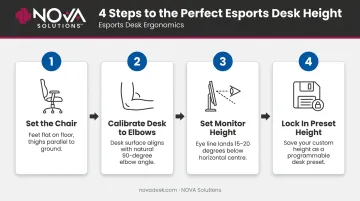
Follow this sequence in order. Skipping steps or doing them out of order produces the same cascading misalignment described earlier.
Set the chair first. Sit naturally and adjust the chair until your feet rest flat on the floor, your thighs are roughly parallel to the ground, and your hips aren't tilted forward or backward. A neutral pelvis means your lower back has a slight natural curve — not pressed flat against the backrest and not arched excessively.
Calibrate the desk to your elbows. Let your arms hang naturally from relaxed shoulders, then bend at the elbows to about 90 degrees. The desk surface should sit at or very slightly below your forearm height. Check that your shoulders should not be shrugging upward, and your wrists should be neither bent up nor bent down toward the surface.
Set the monitor at the correct relative height. OSHA's monitor guidance recommends the top line of the screen at or below eye level, with the center of the monitor ideally 15–20 degrees below horizontal eye level. If your desk is set too low, your monitor drops with it, pulling your neck into a downward angle and creating a second chain of strain.
Lock in your preset height. For players using a height-adjustable desk, save the calibrated height as a preset immediately. Return to that exact setting at the start of every session. Variation between sessions means your body is constantly making small recalibrations instead of building on consistent practice.
FPS vs. Strategy: Do Different Esports Genres Need Different Heights?
The ergonomic foundation is the same across every genre: elbows at 90–110 degrees, forearms parallel, shoulders relaxed. What changes is how you use the surface within that setup.
FPS Players
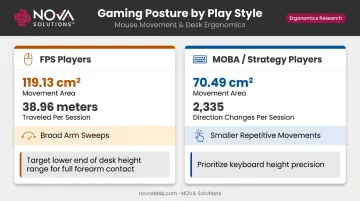
A 2025 kinematic study of 63 esports players found FPS players traveled 38.96 meters over a 10-minute session with a movement area of 119.13 cm² — more than any other genre tested. This means broader arm sweeps, higher acceleration demands, and greater reliance on consistent forearm contact with the desk surface.
For arm-aimers using low-sensitivity configurations, having the desk at the lower end of the correct range — where the forearm rests more fully on the surface — can improve stability during those wide sweeps. The elbow-angle rule still applies; this is fine-tuning within the correct range, not overriding it.
MOBA and Strategy Players
The same study found MOBA players recorded 2,335 direction changes within just 70.49 cm² of movement area. That's a fundamentally different demand — smaller, more repetitive movements with heavy keyboard input.
For MOBA players, wrist angle and keyboard reach are the primary concerns. A desk even slightly too high forces the keyboard into a position where extended sessions accumulate strain at the wrist and shoulder.
Genre doesn't change the formula — it tells you which end of the correct range to prioritize:
- FPS players: Target the lower end of the range so the forearm rests fully on the surface during wide sweeps
- MOBA/Strategy players: Prioritize keyboard height — even minor elevation errors compound over thousands of repetitive inputs
Setting Up an Esports Station for Multiple Players or Training Facilities
Collegiate esports is growing fast. The National Association of Collegiate Esports now supports over 200 member institutions and more than 4,000 student-athletes, with more than 300 programs established across North America since 2016. High school programs are scaling similarly, with 20 state associations offering state-sponsored competition as of 2024.
The Fixed-Desk Problem
Fixed-height desks in shared environments create a predictable outcome: some players are accommodated reasonably well, most aren't. A desk set at 29 inches works for a 5'9" player but is meaningfully too high for a 5'4" player and too low for a 6'1" player. Over a training season, those persistent misalignments add up — a 2026 meta-analysis found 73% one-year pain prevalence among esports players, with wrists and shoulders among the most commonly affected areas.
Solutions for Multi-Station Environments
For institutions equipping multiple stations, three approaches consistently deliver results:
- Adjustable-height desks with memory presets let each player save their calibrated height and recall it instantly — no manual re-measuring each session
- Consistent chair inventory matters as much as the desk; mismatched chair heights across stations undermine even a well-configured desk setup
- Player height profiles documented at the facility level allow quick setup verification when players rotate between stations
NOVA Solutions' esports gaming desks are built for institutional environments like university programs and training labs (including the Keiser University installation), with ADA-compliant configurations, multiple width options (36", 42", 48", or 60"), and integrated wire management to keep multi-peripheral stations organized.
For programs that need adjustable-height functionality, NOVA's sit-stand desk lineup supports the full instructional side of esports facilities — and that adjustability ties directly into how training schedules should be structured.
The 20-8-2 Rhythm for Training Environments
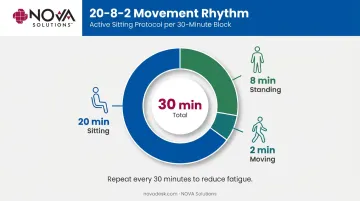
Cornell's ergonomics research, attributed to Dr. Alan Hedge, recommends a movement pattern of 20 minutes sitting, 8 minutes standing, 2 minutes moving per half hour of desk work. For esports training environments with long seated sessions, building structured breaks into practice schedules — brief standing periods, quick movement drills — reduces fatigue accumulation and helps players sustain reaction time later in a session. Sit-stand desk functionality supports this directly.
Frequently Asked Questions
What is the best desk height for competitive gaming?
For most players using a standard gaming chair, 28–30 inches (71–76 cm) is a reliable starting range. The actual best height for your body is wherever your elbows sit at 90–110 degrees with forearms parallel to the surface and shoulders completely relaxed — measure from your seated elbow height, not from a chart.
What is the 20/8/2 rule for standing desks?
The 20-8-2 rule (20 minutes sitting, 8 minutes standing, 2 minutes moving) is an ergonomic movement guideline developed by Dr. Alan Hedge and documented by Cornell University. For esports players, applying this rhythm during long training sessions reduces cumulative fatigue and keeps reaction time more consistent over several hours.
Is a 47-inch desk good for gaming?
A 47-inch desk refers to width, not height. It can work for a single-monitor setup but may feel tight for players who need large mouse pad space or dual-monitor configurations. Height is the more critical ergonomic variable — it's the dimension that directly affects your posture, arm mechanics, and performance.
How do I know if my gaming desk height is wrong?
Watch for these signals:
- Shoulders shrugging or tensing up while using the mouse
- Wrists bending upward or downward to reach the keyboard
- Hunching forward after 30–60 minutes
- Neck strain from looking downward at the monitor
- Forearms not fully resting on the desk surface
Should esports players use a height-adjustable desk?
Yes — especially players who share stations, compete at multiple venues, or train for long sessions. Adjustable desks calibrate precisely to each individual's body and allow height presets that protect consistency across sessions.