A gaming desk is the foundation everything else rests on. Get it right, and peripherals feel natural, cables stay controlled, and long sessions stay comfortable. Get it wrong, and no amount of premium gear compensates for the friction.
This guide covers the six factors that determine whether a gaming desk works for your setup: size, ergonomics, materials, load capacity, cable management, and budget — plus desk shapes, accessibility considerations, and how to match specifications to your actual room and gear.
Key Takeaways
- Surface size and depth matter most — too shallow forces monitors too close; too narrow creates peripheral chaos
- Match desk width to monitor count: 47–55" for single, 55–63" for dual, 63–71"+ for ultrawide/triple setups
- Motorized sit/stand desks reduce back and neck strain — worth the price premium for daily use
- MDF and solid wood outperform glass for durability; glass scratches easily and isn't practical for heavy setups
- Check weight capacity and plan cable management before buying — both affect long-term usability
What Is a Gaming Desk?
A gaming desk is a purpose-built workspace designed to accommodate monitors, peripherals, gaming rigs, and accessories. What separates it from a standard office desk goes beyond aesthetics: gaming desks prioritize surface area, structural depth, technology-integration features, and ergonomics built around hours of continuous, focused use.
"Gaming desk" covers a wide range of form factors. Straight rectangular desks, L-shaped corner desks, and sit/stand motorized frames all qualify. Price points range from under $150 to well over $1,000. The right choice depends on your room dimensions, how many monitors you run, and how many hours per day you actually use the space.
Gaming Desk vs. Regular Office Desk
The differences come down to priorities:
| Feature | Gaming Desk | Standard Office Desk |
|---|---|---|
| Surface area | Wider and deeper by design | Optimized for document storage |
| Cable management | Often integrated | Rarely included |
| Depth | 27–32" typical | 24–27" typical |
| Frame stability | Built for multi-monitor loads | General-purpose |
| Shape options | L-shaped, curved edges, cutouts | Mostly rectangular |
Standard office desks can work for gaming, particularly when the space doubles as a workstation. For hardware-heavy setups with multiple monitors and peripherals, though, a dedicated gaming desk usually delivers more usable surface area and better value per dollar at equivalent price points.
What to Consider When Buying a Gaming Desk
Choosing a gaming desk means matching specifications to real-world conditions: your room, your gear, your height, and how long you typically sit. Six factors drive that decision.
Size and Surface Dimensions
Width should follow your monitor count:
- Single monitor: 47–55 inches
- Dual monitors: 55–63 inches
- Ultrawide, triple-monitor, or streaming rig: 63–71+ inches
More width reduces visual clutter and gives peripherals space to move. But depth is just as important — and far more often underestimated.
A minimum of 27–30 inches of depth allows monitors to sit at roughly arm's length, supports forearm placement to reduce wrist strain, and gives your mouse enough room to move. More width reduces visual clutter and gives peripherals space to move. Depth matters just as much — and is far more often underestimated.
A minimum of 27–30 inches of depth allows monitors to sit at roughly arm's length, supports forearm placement to reduce wrist strain, and gives your mouse enough room to move. According to OSHA's computer workstation guidelines, the desk should allow the user to maintain a comfortable, neutral posture with wrists flat. Desks under 24 inches deep push monitors too close, causing eye strain.
Ergonomics and Height Adjustability
Proper desk height keeps elbows at roughly 90 degrees, wrists flat on the surface, and eyes level with the top of the monitor. Standard fixed-height desks at 28–30 inches work for average-height users. Taller or shorter gamers benefit from an adjustable frame — consult an ergonomic height chart based on your actual height before purchasing.
The more significant upgrade is motorized sit/stand capability. Research published in PMC links reduced sitting time to decreased chronic low back pain — a real concern for anyone gaming several hours daily. Alternating between sitting and standing during long sessions improves circulation and sustains focus in ways fixed-height desks simply can't.
A few practical notes on motorized desks:
- Dual-motor systems are more stable under heavy loads than single-motor options
- Programmable height presets make transitioning effortless — you set your sitting and standing heights once
- Manual crank desks achieve the same height range but require effort; few people actually use them regularly
Material and Build Quality
Tabletop materials ranked by practical durability:
- Solid wood — most durable, premium price, ages well
- MDF/engineered wood — cost-effective, nearly as durable as solid wood, most common in gaming desks
- Carbon fiber texture — durable with a gaming aesthetic, mid-to-premium price
- Glass — visually striking, but scratches easily, fragile under heavy use, impractical for daily gaming
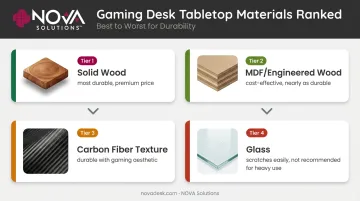
In practice, glass is the weakest choice: dropped peripherals or sustained load can crack or scratch it quickly.
Frame construction matters just as much as the top:
- Steel or powder-coated steel frames offer the best stability
- T-frame and 4-leg designs place legs toward the center, reducing surface flex under load
- Z-frames and X-frames prioritize aesthetics but are more prone to tabletop flex under heavy monitor/PC setups
Weight Capacity and Load Rating
Gaming setups are heavier than they look. Two monitors, a full tower PC, speakers, and accessories can easily reach 80–100 lbs before you add a monitor arm or additional peripherals.
| Setup Type | Recommended Minimum Capacity |
|---|---|
| Single monitor + laptop/tower | 100–150 lbs |
| Dual monitor + tower + peripherals | 150–200 lbs |
| Triple monitor / streaming rig | 250–300+ lbs |
Weight capacity becomes especially critical on motorized desks. Exceeding the rated weight on a sit/stand frame destabilizes the lift mechanism, reduces motor lifespan, and creates a safety hazard during height transitions. Always calculate your full load — desk surface included — before selecting a motorized frame.
Cable Management
Poor cable management is one of the most common post-purchase frustrations in gaming setups. Cables tangled under the desk get stressed at connection points, create fire hazards, and make the workspace look chaotic regardless of how premium the gear is.
What functional cable management actually includes:
- Under-desk cable trays (wide enough for power strips, not just USB cables)
- Grommets for routing cables through the surface cleanly
- Spine clips or wire channels to organize runs along the desk frame
- Removable access panels for maintenance without disassembly
A useful test: can the tray fit a full power strip and a bundle of thick cables side by side? If not, the cable management is decorative, not functional. Confirm this before purchasing — most manufacturers photograph desks without any cables routed.
Budget and Long-Term Value
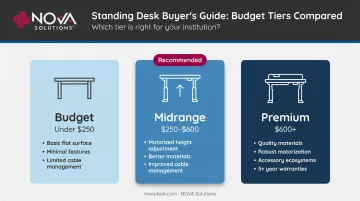
The gaming desk market breaks into three clear tiers:
| Tier | Price Range | What You Get |
|---|---|---|
| Budget | Under $250 | Basic flat surface, minimal features, limited cable management |
| Midrange | $250–$600 | Motorized height adjustment, better materials, improved cable management |
| Premium | $600+ | Quality materials, robust motorization, accessory ecosystems, 5+ year warranties |
The long-term math favors spending more upfront. A well-built $400 desk that lasts 8–10 years costs roughly $45/year. A $150 desk replaced every 2–3 years runs $60–75/year, plus the hassle of setup and disposal each time.
Motorized desks with solid warranties have the best ROI for daily-use setups. Look for warranties of at least 5 years on the frame and motor components.
Gaming Desk Types: Which Shape Fits Your Setup?
Straight/Rectangular Desks
The most versatile option. Available in the widest range of widths, compatible with most single- and dual-monitor setups, and easy to reposition in a room. If you're unsure what shape you need, start here.
L-Shaped/Corner Desks
Maximize surface area by using corner space — ideal for triple-monitor setups, dual-workstation configurations, or anyone who needs a secondary work surface alongside their gaming setup. The tradeoff: motorized sit/stand L-desks are harder to find, and corner placement reduces room flexibility.
Motorized vs. Manual Height Adjustment
- Motorized: Raises/lowers at a button press; supports programmable presets; practical for daily use
- Manual crank: Achieves the same height range but requires effort; few users switch positions regularly
If you plan to actually use the standing feature, motorized is the only practical choice.
Accessibility Considerations
For users with mobility challenges or wheelchair users, desk accessibility follows specific dimensional requirements. ADA standards require adequate knee clearance (minimum 27" height at the front edge, minimum 30" width) and sufficient toe clearance beneath the desk.
NOVA Solutions designs all its eSports Gaming Desks to be ADA compliant, with a 32-inch height option and precise knee and toe clearance built into the specification — concrete dimensions worth referencing when evaluating any accessible workspace.
How NOVA Solutions Can Help
NOVA Solutions is a US-based manufacturer with over three decades of experience building ADA-compliant, technology-integrated furniture for educational institutions, government agencies, and corporate environments. Their eSports Gaming Desk line is available in four widths (36", 42", 48", and 60") with a standard 30" depth, purpose-built for competitive gaming environments.
Each desk ships with gaming-specific features designed for multi-monitor setups and clean cable management:
- Integrated wire management channels and surface grommets
- Optional slide-out PC shelves for elevated tower placement
- Metal under-desk PC holders that keep the surface clear for dual or triple monitors
Edge banding comes in black, white, red, and blue, so esports programs can align desks with team colors. The desks are ADA compliant and have already been deployed in collegiate esports facilities — Keiser University's gaming lab is one confirmed installation.

For universities building esports labs, government training facilities, or corporate clients establishing performance workstations, NOVA holds GSA contract GS-28F-005GA. That contract provides 61.71% off list price and eliminates the need for separate competitive bidding — a significant advantage for institutions working within procurement compliance requirements.
Products ship fully assembled from NOVA's Effingham, Illinois facility, ready for immediate deployment without on-site setup labor.
Contact NOVA Solutions to request a configuration quote — their team can walk through desk sizing, ADA requirements, and GSA purchasing options specific to your facility.
Conclusion
The best gaming desk isn't the most expensive one — it's the one that matches your specific setup, room dimensions, session habits, and posture needs. A desk that fits the space and the gear removes friction from every session.
That fit, however, needs room to grow. Monitors get added, towers get upgraded, rooms get rearranged. Choosing a desk with built-in flexibility — a motorized height range, a surface large enough to accommodate a future monitor, a solid load rating — protects that investment as the setup evolves. When the hardware changes substantially, it's worth checking whether the desk still fits the build — not just physically, but ergonomically.
Frequently Asked Questions
What should I look for in a gaming desk?
Focus on five things: surface width matched to your monitor count, depth of at least 27–30 inches for proper viewing distance, height that keeps your posture aligned, load capacity rated above your total gear weight, and integrated cable management that handles full cable bundles, not just USB cables.
Which gaming desk should I buy?
It depends on your setup size, room, and budget. Single-monitor users can start with a 47–55" desk; dual-monitor setups need at least 55–63". Daily gamers should seriously consider a motorized sit/stand model, since the ergonomic payoff across thousands of hours of use justifies the price difference.
What is the best size for a gaming desk?
Match width to monitor count: 47–55" for single, 55–63" for dual, 63–71"+ for ultrawide or triple-monitor rigs. Regardless of width, use a desk at least 27" deep — that's the minimum for safe monitor viewing distance and comfortable mouse movement.
Is a height-adjustable gaming desk worth it?
Yes, for daily-use setups. Alternating between sitting and standing reduces back and neck strain over long sessions. Motorized desks with programmable presets make the habit easy to maintain, and the ergonomic payoff compounds over time.
What material is best for a gaming desk surface?
MDF or solid wood for most buyers — both are durable, stable, and hold up to daily use. Glass looks premium but scratches easily and isn't practical for heavy, high-use setups. Carbon fiber works well when aesthetics matter as much as durability.
How much weight should a gaming desk support?
Plan for at least 100–150 lbs for a single-monitor setup, 150–200 lbs for dual monitors, and 250–300+ lbs for multi-monitor or streaming rigs. On motorized desks, never exceed the rated capacity, as doing so damages the lift mechanism and creates a safety risk during height adjustments.