Introduction
ADA compliance in office environments is easy to misunderstand — and that misunderstanding has real consequences. Many organizations assume the law only applies to parking lots, restrooms, and building entrances. Accessibility obligations extend further: into every room where employees work or visitors are served, including how furniture is specified and arranged.
Non-compliance creates genuine exposure: barrier complaints, litigation, and expensive retrofits. Physical accessibility is the most commonly reported type of ADA discrimination, accounting for 46.6% of cases — and workplace environments are frequently cited examples.
This guide covers the specifics:
- What the ADA actually requires of office furniture
- Dimensions for desks, clearances, and circulation paths
- How training rooms must be configured
- The most common mistakes organizations make after furniture is installed
Key Takeaways
- ADA Standards regulate fixed/built-in elements — but moveable furniture still creates violations when it blocks accessible routes or clearances
- ADA-compliant work surfaces must be 28–34 inches high, with knee clearance of 27 inches vertical and 30 inches wide minimum
- Accessible routes need 36 inches minimum clear width; wheelchair turning spaces require a 60-inch diameter clear floor area
- Title I (employment) applies to businesses with 15+ employees; Title III (public access) applies to virtually all businesses regardless of size
- Sit-stand desks let a single workstation serve both wheelchair users and standing workers — no separate setups needed
Does the ADA Actually Apply to Office Furniture?
The short answer: not directly to the furniture itself, but very much to how it's placed.
The U.S. Access Board states clearly that the DOJ and DOT ADA Standards apply to elements that are fixed or built-in. Freestanding, moveable furniture — desks, chairs, tables — is "generally not addressed or covered" as a product category. There is no ADA certification label a freestanding desk must earn.
Why Moveable Furniture Still Creates Compliance Obligations
The compliance risk comes from placement, not the product. When furniture is arranged in ways that obstruct required clearances, the space itself falls out of compliance, even if the individual pieces are well-designed.
Under 28 CFR § 36.304, places of public accommodation must remove architectural barriers where "readily achievable." That standard is more specific than it sounds:
- Rearranging tables, chairs, vending machines, and display racks counts as required barrier removal under the regulation
- A chair blocking an aisle isn't just untidy — it's potentially a violation
- The obligation applies regardless of whether the furniture itself was purpose-built for accessibility
Who Must Comply
The placement obligations above fall on different organizations depending on which ADA title applies to them.
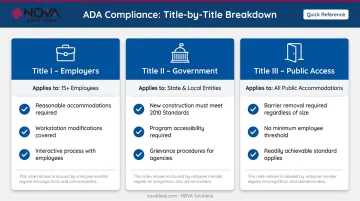
| ADA Title | Who It Covers | Furniture Relevance |
|---|---|---|
| Title I | Employers with 15+ employees | Must provide reasonable accommodations, including workstation modifications |
| Title II | State and local government | New construction and alterations must meet 2010 Standards fully |
| Title III | Places of public accommodation | Must remove accessible barriers where readily achievable; applies regardless of size |
Specifying furniture that aligns with ADA dimensional standards, even for moveable pieces, reduces layout-driven violations and makes reasonable accommodation requests straightforward to satisfy.
ADA Requirements for Desks and Work Surfaces
Surface Height and Knee Clearance
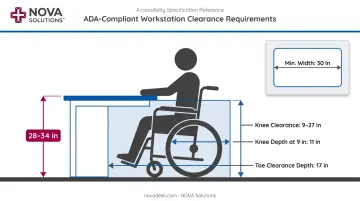
The 2010 ADA Standards, Section 902 establish that accessible work surfaces must have a top height between 28 and 34 inches above the finished floor. This applies directly to fixed or built-in surfaces; for moveable furniture, it represents the standard any accessible workstation should meet.
Beneath the surface, Section 306 specifies a knee and toe clearance profile:
- Vertical space: between 9 and 27 inches above the floor
- Minimum width: 30 inches
- Knee depth: at least 11 inches at the 9-inch height, tapering to 8 inches at 27 inches
- Toe clearance: minimum 17 inches depth below the 9-inch mark
This clearance profile allows a wheelchair user to pull fully up to the desk surface — the practical test any accessible workstation must pass.
Fixed vs. Moveable Work Surfaces
When a desk or counter is permanently installed — a built-in reception desk, a fixed workstation, a laboratory bench — the ADA Standards become mandatory, not advisory. Section 226.1 requires that where work surfaces are provided for use by people other than employees, at least 5 percent must comply with Section 902. Those required surfaces must also be dispersed throughout the space, not grouped in one accessible corner.
Height-Adjustable Desks as a Practical Solution
For moveable furniture, the picture shifts. The ADA does not mandate that all moveable desks be height-adjustable. What it does require, under Title I, is that employers provide reasonable accommodations — which can include workstation modifications for individual employees. The Job Accommodation Network identifies sit-stand and adjustable-height workstations as recognized accommodation options.
Height-adjustable desks address this practically: they serve wheelchair users at lower settings and standing workers at higher ones, satisfying both ergonomic and accessibility requirements from a single piece of furniture. NOVA Solutions' computer training desks are available in ADA-compliant 32-inch configurations, and the height-adjustable sit/stand models offer electric adjustment with 12 inches of vertical travel to cover the full range.
Clear Floor Space at Workstations
Beyond the desk dimensions themselves, each accessible workstation requires 30 inches by 48 inches of clear floor space at the approach. This is a layout requirement, not a furniture one — but it means the workstation arrangement, not just the desk spec, determines whether accessibility is actually achieved.
ADA Clearance and Circulation: How Furniture Placement Affects Compliance
This is where most real-world violations happen. A space can be designed correctly, equipped with compliant furniture, and still fall out of compliance based on how that furniture is arranged — or rearranged over time.
Aisle Width and Turning Space
Two dimensions govern circulation in any furniture-occupied space:
- Accessible routes: Section 403.5.1 requires 36 inches minimum clear width for walking surfaces on accessible routes
- Turning space: Section 304.3.1 requires a 60-inch minimum diameter circular turning space, required at aisle ends, in meeting rooms, near workstations, and in break areas
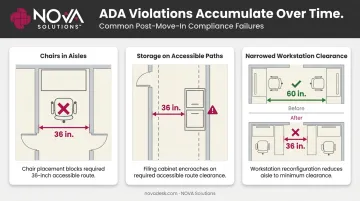
Common problems: pushed-together desks, chair backs protruding into aisles, filing cabinets placed adjacent to routes, and workstation reconfigurations that gradually narrow clearances. Each of these is a small shift — and any one of them can push a compliant space out of compliance.
Seating Clearances and Reach Ranges
At each accessible seating position, the same 30-by-48-inch clear floor space applies. In meeting rooms and training spaces, accessible seating positions must also be dispersed — not all grouped in one row or corner.
For storage, shared resources, and workstation accessories, Section 308 establishes reach ranges. Both forward and side reach follow the same limits: 15 inches minimum (low) to 48 inches maximum (high). A printer shelf at 52 inches creates an access problem even if everything else in the room is correctly configured. The same applies to bookshelves, supply cabinets, and technology controls — their placement relative to accessible workstations must stay within this range.
Flooring and Furniture Weight
Section 302.2 requires carpet and carpet tile to have a maximum pile height of 1/2 inch, with firm backing or padding. Heavy furniture on thick carpet compounds this: it's harder to reposition, and compression creates uneven surfaces for mobility device users. Furniture specification and floor specification need to be considered together.
ADA Requirements for Conference and Training Rooms
Training rooms and conference spaces have the same core dimensional requirements as individual workstations — but the multi-user nature of these spaces adds complexity.
Table Requirements and Accessible Seat Distribution
The 28–34 inch surface height and Section 306 knee clearance profile apply to conference and training tables. For fixed or built-in tables used by non-employees, at least 5 percent must comply, and required accessible positions must be dispersed throughout the room.
For assembly areas with fixed seating, Section 221 specifies wheelchair space counts based on total capacity:
- 4–25 seats: 1 wheelchair space
- 26–50 seats: 2 spaces
- 51–150 seats: 4 spaces
- 151–300 seats: 5 spaces
Assembly wheelchair spaces must be 36 inches minimum wide and 48–60 inches deep depending on entry direction.
Layout Planning for Training Environments
A training room that seats 30 people needs careful layout work to maintain:
- 36-inch aisle clearances between rows
- A 60-inch turning diameter somewhere within the room
- 30-by-48-inch clear floor space at each accessible position
- Dispersed accessible seating, not clustered at the back or sides
Modular, reconfigurable training furniture helps here — layouts can be adjusted as room configurations change without requiring new furniture purchases. NOVA Solutions' training tables are designed with the ADA knee clearance profile and surface height standards built in, and the company provides CAD and REVIT files to support compliant layout planning before furniture is ordered.

Technology Integration and Reach Ranges
Layout compliance doesn't end with furniture placement — technology integration introduces its own requirements. Controls, ports, and display surfaces must remain within the 15–48 inch reach range. Common violations include:
- Monitors positioned above the compliant range
- Power centers mounted on the back of pedestals, out of reach
- Control panels installed above 48 inches
NOVA's iMod™ wire management system routes cables within the unit rather than through the knee clearance zone. The Trolley™ Monitor Lift and Downview™ display systems keep screens positioned relative to the work surface rather than mounted on high wall panels — which supports usability within standard reach ranges.
Common ADA Compliance Mistakes with Office Furniture
Most violations aren't committed during initial design. They accumulate over time.
Blocking Routes After Move-In
The most frequent ongoing problem: furniture gradually migrates into accessible routes. Over months, this looks like:
- Chairs left in aisles or near turning spaces
- Storage pushed against walls along accessible paths
- Workstation reconfigurations that quietly shave inches off the 36-inch minimum
A space that passed a post-construction review can fail a year later without anyone making a deliberate change.
Regular walkthroughs with a tape measure (specifically checking aisle widths and clear floor spaces) are more effective than any single compliance review.
Assuming Freestanding Furniture Is Exempt
Many organizations believe that because moveable furniture isn't technically "covered" by ADA product standards, placement doesn't matter. This misreading causes real violations. The barrier-removal obligation under 28 CFR § 36.304 applies to furniture arrangement explicitly: rearranging tables and chairs is listed as an example of required action.
Neglecting Private Offices
Private offices in workplaces must be accessible. Doorways need a 32-inch minimum clear opening (Section 404.2.3). Hardware must be operable without tight grasping or twisting.
Furniture arrangement inside the office matters just as much. A private office packed with storage units and extra chairs can easily fail ADA standards even when the door hardware is correct.
Frequently Asked Questions
Does the ADA apply to furniture?
The ADA Standards apply to fixed and built-in elements, not freestanding furniture as a product category. However, the placement of moveable furniture still creates compliance obligations: blocking routes or clearances with chairs and desks violates barrier-removal requirements under 28 CFR § 36.304.
What are the ADA requirements for desks?
Accessible work surfaces must be 28–34 inches high, with knee clearance space between 9 and 27 inches above the floor, 30 inches minimum width, and at least 11 inches of depth at the 9-inch mark. A 30-by-48-inch clear floor space is also required at the approach to any accessible workstation.
What is the ADA compliant desk height?
Height-adjustable desks are the most practical solution for meeting this requirement. They accommodate wheelchair users at lower settings while serving standing workers at higher ones — a single piece of furniture that covers both use cases without additional modifications.
What is the ADA clearance around furniture?
Accessible routes must maintain at least 36 inches of clear width. Wheelchair turning spaces require a 60-inch minimum diameter clear floor area. Each accessible seating position also requires a 30-by-48-inch clear floor space at the approach.
Do private offices need to be ADA compliant?
Yes. Private workplace offices must have doorways with at least 32 inches of clear opening width, door hardware that doesn't require tight grasping, and interior furniture arranged to preserve required maneuvering clearances throughout the space.
What is the minimum number of employees for ADA?
Title I employment provisions apply to businesses with 15 or more employees for 20 or more calendar weeks. However, Title III barrier-removal obligations apply to places of public accommodation of any size — the 15-employee threshold is specific to employment discrimination, not physical accessibility.