Introduction
A conference room can seat 12 people and still fail. Cramped aisles, blocked sightlines, tangled cables running across the floor, and seats that nobody can reach without climbing over colleagues — these problems aren't fixed by better meeting facilitation. They're fixed at the layout planning stage.
Furniture layout is the foundation. Get it right and the room supports every meeting that happens inside it. Get it wrong and even the best AV setup can't compensate.
This guide is written for facility managers, office administrators, space planners, government procurement officers, and educational coordinators setting up, renovating, or reconfiguring a conference or training room. It covers, in order:
- Layout style selection
- Room measurement and capacity planning
- Clearance standards and traffic flow
- ADA accessibility requirements
- Technology and AV integration
Key Takeaways
- Layout type (boardroom, U-shaped, classroom, theater, collaborative) should match your meeting format — not headcount alone
- Clearance minimums and room-to-table sizing ratios determine whether a room functions, not just whether furniture fits
- ADA accessibility — path widths, table heights, accessible seating — must be resolved during layout planning, not retrofitted later
- Technology placement (displays, cameras, power, cable routing) should be locked in before furniture is ordered
- Government and institutional buyers should verify GSA contract availability, ADA certification, and fully assembled shipping to cut total deployment cost
Conference Room Layout Types and When to Use Each
No single layout works for every use case. Selecting the wrong style — even in a well-proportioned room — limits interaction, reduces presenter visibility, or wastes usable floor space. The decision should start with meeting format, then headcount, then whether the space needs to serve multiple purposes across the week.
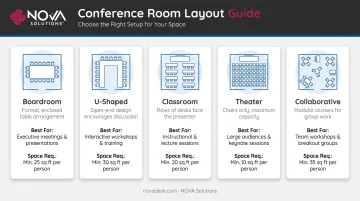
Here's a quick reference before diving into the details:
| Layout | Best For | Space Requirement |
|---|---|---|
| Boardroom | Executive sessions, collaborative decisions | Moderate — scales with table length |
| U-Shaped | Training, facilitated workshops | High — open end needs presenter clearance |
| Classroom | Instruction, orientations | Moderate — row/aisle spacing critical |
| Theater | Large presentations, all-hands | Low per seat — no table surfaces |
| Collaborative | Brainstorming, cross-functional teams | Flexible — modular furniture required |
Boardroom / Conference Style
Chairs placed around all sides of a central table or joined tables. Everyone faces everyone else, which promotes equal participation and direct eye contact. Best suited for executive sessions, board meetings, and collaborative decision-making groups.
The table length relative to room length is the critical variable here. Too long a table leaves no functional walk space at each end; too short and the room feels underfurnished. Matching table length to room dimensions — accounting for chair depth plus clearance at both ends — is the first calculation to make.
U-Shaped Layout
Tables arranged in a U with the presenter positioned at the open end. Its strength is presenter mobility: the facilitator can move freely, engage each attendee directly, and refer to displays without turning away from the group. It requires more floor space than boardroom style and performs best in rectangular rooms. Works well for training sessions, facilitated workshops, and interactive presentations.
Classroom / Training Layout
Rows of tables with chairs all facing a single focal point — a screen, whiteboard, or instructor station. Maximizes note-taking capacity and suits training sessions, orientations, and instructional formats where the instructor leads and participants follow along.
Row spacing and aisle widths are critical planning variables in this configuration. Peer interaction between rows is structurally limited by design, which is appropriate for instruction but less so for group problem-solving.
Theater / Lecture Style
Rows of chairs without tables (or with minimal surface space), maximizing seating density. Suited to large presentations, all-hands gatherings, and events where attendees primarily listen. As Cornell Event Services notes, theater layouts allow the maximum number of people in a meeting room — but occupancy drops as soon as podiums and projectors are added.
The absence of table surfaces removes participant workspace entirely. Theater style is rarely appropriate for training rooms.
Collaborative / Huddle Layout
Modular, reconfigurable clusters — lightweight tables in groups, varied surface heights, informal arrangements. Supports brainstorming, cross-functional sessions, and informal discussions. What makes this work is furniture that moves easily, connects in modules, and reconfigures between uses without tools.
Steelcase research across 5,000 employees in 11 countries found 64% of workers value hybrid collaboration spaces more than before — and 47% report that enclosed collaboration spaces are often too small, with 37% finding them physically uncomfortable. That points to a clear planning implication: rooms built around fixed configurations will fail a significant share of users.
For spaces that need to shift between group sizes and meeting formats, the furniture itself has to be part of the solution. NOVA Solutions' Collaboration Tables — available in keystone, D-top, round, and boat-shaped configurations — are designed for exactly this: modular connections that let you reconfigure the room without replacing what's in it.
How to Plan Your Conference Room Furniture Layout Step by Step
Step 1: Measure the Room and Document Constraints
Before selecting any furniture, document:
- Accurate room dimensions (length, width, ceiling height)
- Door locations and swing direction
- Window placements
- Columns, alcoves, or recesses
- HVAC vent positions
- Electrical outlet and data port locations
Fixed architectural features constrain furniture placement and traffic flow in ways that cannot be corrected after purchase. A column in the wrong place eliminates a seating position. A door that swings inward eats into clearance space. Map these first.
Step 2: Establish Primary Use Case and Headcount
Determine the dominant meeting type — executive meetings, training sessions, presentations, or collaborative work — and the realistic headcount range. Not just the maximum.
Oversizing a layout for the rare large meeting creates a space that functions poorly for everyday use. The room that seats 20 on quarterly review day but hosts 6-person team meetings three times a week should be planned around the 6-person reality, with flexibility built in for the exception.
Headcount and use case together determine which layout styles are even viable — and that decision drives every furniture choice that follows.
Step 3: Apply Clearance and Sizing Standards
Space planning standards give you the numbers that separate "it fits" from "it works." Key reference points:
| Clearance Type | Standard Guidance |
|---|---|
| Accessible route (ADA) | 36-inch minimum continuous clear floor width |
| Passage behind seated occupants | 33–36 inches from table edge to wall or obstruction |
| Table-to-display distance | Varies by screen size; AVIXA DISCAS methodology applies |
| Table surface per seat | 24 inches minimum width per occupant |
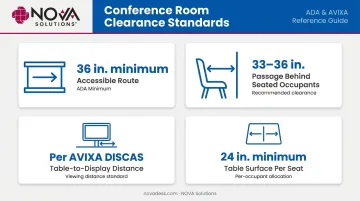
For display sizing and viewing positions, AVIXA's DISCAS standard (202.01:2016) provides a methodology based on user need and viewing distance — the appropriate framework for determining screen size relative to seating arrangement.
Room-to-table sizing should account for chair depth (chairs pushed back from the table), clearance for passage behind seated occupants, and functional end space. The goal is a room where people can sit, rise, move, and exit without coordinating.
Step 4: Plan for ADA Accessibility
ADA requirements that directly affect conference room layout:
- Accessible routes: The U.S. Access Board requires a minimum 36-inch continuous clear floor width for accessible routes, with reductions to 32 inches permitted only at specific points for a maximum of 24 inches
- Table surface height: ADA Section 902 requires work and dining surface tops to be 28 inches minimum to 34 inches maximum above the finished floor for accessible positions
- Knee and toe clearance: Accessible table positions require clear floor space for a forward approach with compliant knee and toe clearance
Cable routing is easiest to solve before furniture is specified. Running cables across a finished layout — or cutting into surfaces after installation — creates both aesthetic and safety problems. NOVA Solutions' iMod™ wire management system addresses this by routing cables through a dedicated compartment on the back of each unit, with a built-in multi-plug power strip per user. Optional worksurface grommets and power centers handle additional connectivity without surface clutter.
Key Factors That Shape Your Conference Room Layout
Room Geometry and Fixed Architecture
A rectangular room opens different layout options than a square room. Columns or recessed walls restrict table placement and traffic flow. Ceiling height — WBDG notes that its Conference/Classroom space type excludes spaces requiring ceilings above 12 feet — affects projector mounting height, acoustic performance, and screen sizing.
Assess geometry first — the room's shape often eliminates one or two layout options before any other variable comes into play.
Headcount Variability and Multi-Purpose Use
Rooms that serve variable group sizes or multiple configurations require modular, reconfigurable furniture rather than fixed installations. WBDG specifically identifies conference and classroom spaces as needing modular furniture that is light and easily rearranged, with integrated utilities and movable partitions.
Planning exclusively for maximum capacity creates a layout that feels oversized and impersonal for smaller groups.
Technology Infrastructure and Wire Management
The location of power outlets, AV cabling routes, and data port placement directly affect where furniture can go. Layouts that ignore infrastructure constraints end up arranged around outlet locations rather than meeting needs — with visible cables that undermine both safety and appearance.
WBDG confirms these spaces require integrated utility lines across three categories:
- Voice — for teleconference and intercom systems
- Data — for network connectivity and device access
- Power — for multimedia, AV, and videoconference equipment
Address infrastructure placement during layout planning, not after furniture arrives.
Choosing Furniture That Fits Your Layout Goals
Functional Attributes to Evaluate
When selecting conference and training room furniture, the catalog view lies. A table that looks appropriately scaled in a product photo may occupy significantly more floor space once chairs and clearance are factored in. Evaluate:
- Table dimensions relative to actual room dimensions (not estimated)
- Shape compatibility with layout type (rectangular for boardroom/classroom, boat-shaped for executive environments, modular for collaborative configurations)
- Structural performance — ANSI/BIFMA X5.5-2021 provides the standard basis for evaluating safety, durability, and structural performance of commercial desk and table products
- Surface finish durability for the use frequency the room demands
NOVA Solutions' conference table line covers rectangular, racetrack, boat-shaped, and circular configurations, all with high-pressure laminate surfaces and 2mm PVC edge banding. Ten laminate color options and a choice of laminate or metal cross base allow the furniture to match the room's functional and aesthetic requirements.
Technology-Integrated Furniture
Two NOVA Solutions products directly address the technology-placement problem at the furniture level:
- Trolley™ Monitor Lift: Conceals monitors below the worksurface when not in use via a motorized lift — Trolley™ E handles monitors up to 20 inches; Trolley™ EXL handles up to 24 inches. Push-button activation with automatic access doors. Available in single and double user configurations at 30-inch or 32-inch (ADA-compliant) heights.
- Downview™ Visual Display: Recesses monitors beneath tinted tempered glass viewports for a natural downward gaze, eliminating raised monitor barriers that block instructor-to-participant sightlines. Available in three viewport sizes, compatible with conference, training, and collaboration table configurations.
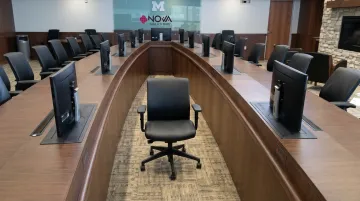
Both systems integrate with the iMod™ wire management compartment, keeping power and data connections contained from day one.
Procurement Criteria for Government and Institutional Buyers
For government agencies, educational institutions, and corporate facilities with formal procurement processes, the right furniture manufacturer simplifies the entire acquisition cycle — not just the furniture selection. These criteria reduce procurement complexity and deployment cost:
- Manufactured in Effingham, Illinois — NOVA Solutions' Made in USA status satisfies domestic sourcing requirements without additional vendor verification
- Arrives fully assembled — computer training desks, training tables, and lecterns are ready to use upon delivery, with no on-site assembly labor required
- ADA-certified across conference tables, training tables, collaboration tables, and multi-purpose tables — compliance documentation available for facility audits
- GSA Contract GS-28F-005GA (SIN 33721) provides 61.71% off list price through February 2027, eliminating competitive bidding for eligible agencies
Frequently Asked Questions
Frequently Asked Questions
How big should a 12-person conference room be?
A 12-person conference room typically requires 400–450 square feet to accommodate a standard table with functional clearance at both ends and along the sides. ADA mandates a 36-inch minimum continuous accessible route throughout the room. For comfortable movement beyond minimum compliance, plan for additional clearance behind seated occupants on each side.
What are the dos and don'ts for conference room layout?
Do: Apply ADA clearance standards, match layout type to meeting format, and resolve display placement and cable routing before ordering furniture. Don't: Size every element for maximum occupancy, place screens after furniture is set, or ignore infrastructure constraints when positioning tables.
How can I make a conference room look nice using furniture and layout?
Consistent furniture style, appropriate table scale relative to room size, and integrated cable management that eliminates visible surface and floor cabling drive most of the visual result. Adequate clearance matters too — a room that feels open projects a well-designed appearance before any aesthetic choices come into play.
What are the latest conference room furniture and layout trends?
Modular, reconfigurable furniture for multi-use rooms, technology integration built into table surfaces rather than added on top, and hybrid-work-oriented layouts that accommodate both in-room and remote participants. ADA compliance is now a baseline design requirement for most institutional and corporate procurement — not a box to check at the end.
What is the best conference room layout for presentations?
Classroom style maximizes viewing capacity and note-taking space; U-shaped allows the presenter to engage participants more directly. The choice depends on group size and the degree of interaction expected — classroom for larger instructional groups, U-shaped for smaller facilitated sessions.
How much space do you need per person in a conference room?
Most planning standards target 20–25 square feet per person, though the actual figure shifts based on layout type and table configuration. Table surface width per seat, chair depth, and wall clearance must be calculated together — not independently — to arrive at a functional total.