The stakes are real. Research on undergraduate students found that uninterrupted classroom sitting correlates with increased discomfort and sleepiness, with 68.5% of participants reporting significant pain in at least one body area in the prior 12 months. That's not an edge case — it's the majority of students walking into class already dealing with musculoskeletal issues.
College classrooms also carry obligations that K-12 settings don't face in the same way: ADA Title II requirements, federal financial assistance conditions under Section 504, longer class periods, and a far more diverse student population in terms of age, body type, and physical ability. General-purpose seating built for a 19-year-old won't serve a returning adult learner, a wheelchair user, or a student with a temporary injury.
This guide covers what facility managers and procurement teams actually need to know: the evidence behind ergonomic classroom furniture, the specific categories worth evaluating, ADA compliance requirements, technology integration, and how to procure effectively.
Key Takeaways
- Prolonged static sitting causes discomfort and reduced alertness — adjustable furniture directly supports better learning
- Key furniture categories include height-adjustable desks, ergonomic seating, modular/collaborative tables, and sit/stand instructor lecterns
- ADA Title II and Section 504 require accessible, dispersed seating — not just a single "accessible spot" at the end of a row
- Built-in power access and wire management are standard requirements for modern classroom furniture
- Evaluate adjustability range, durability, ADA certification, and GSA/cooperative contract availability before purchasing
Why Ergonomic Furniture Matters in College Classrooms
The Physical and Cognitive Reality
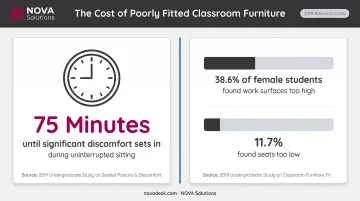
A 2019 study of 54 undergraduates found that discomfort became significant after 75 minutes of uninterrupted sitting — exactly when a typical college class session is hitting its midpoint. Sleepiness impairment showed up even earlier, after just 15 minutes.
Physical discomfort doesn't stay physical. When students are managing back pain or restlessness, they're spending cognitive resources on that instead of on course content. A 2022 study of 298 higher education students found that 38.6% of female participants perceived work surfaces as too high and 11.7% perceived chair seats as too low — neither group was in a position to focus well on anything else.
The Active Learning Problem
The shift toward flipped classrooms, group projects, and discussion-based formats has changed what college classrooms actually need to do. Fixed rows of desks bolted to the floor obstruct those pedagogical goals entirely. A study of 131 students found that increasing the number of furniture configurations in an active learning classroom had a statistically significant positive impact on self-reported learning outcomes — the room layout itself was a variable in student performance.
A Population That Doesn't Fit One Chair Size
Room flexibility matters even more when you consider the range of people in those rooms. College student populations include:
- Traditional students across a wide range of body types and heights
- Adult learners and returning workforce students
- Students with documented disabilities and those managing temporary injuries
- Older students whose musculoskeletal needs differ from 18-year-olds
One-size-fits-all furniture fails most of these groups at some point. When seating and work surfaces don't accommodate the actual range of bodies in the room, the problem isn't just discomfort — it's reduced engagement, lower perceived course quality, and spaces that communicate exclusion rather than inclusion.
Key Ergonomic Furniture Types for College Classrooms
The right mix depends heavily on classroom format — what works in a seminar room differs from a 200-seat lecture hall or a dedicated computer lab. Here's how to think through each major category.
Height-Adjustable Desks and Tables
A desk is ergonomically sound for college use when it:
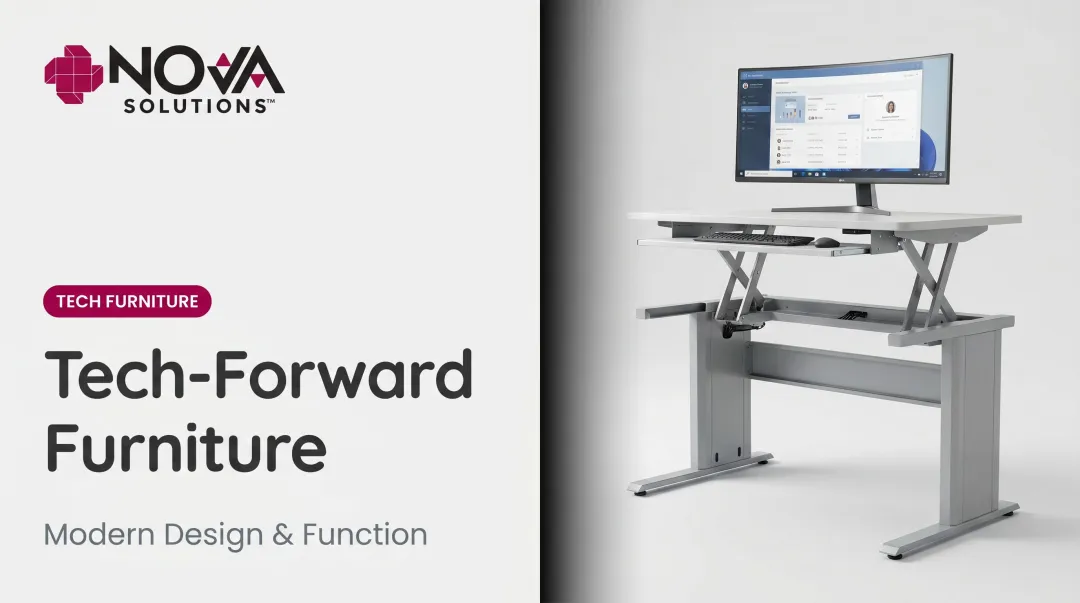
- Offers an adjustable height range that accommodates seated and standing positions
- Provides enough surface area for a laptop and a notebook simultaneously
- Stays stable under active use — writing, typing, leaning
ANSI/HFES 100-2007 specifies that sit-only input-device support surfaces should adjust between 56–72 cm (22–28.3 inches) from the floor. The standard emphasizes adjustable ranges over fixed dimensions — spec sheets citing a rigid "ideal height" without an adjustability range are less useful than they appear.
Sit-to-stand desks deserve particular attention in college settings. University students are estimated to spend more than 7 hours per day sedentary, and standing desk interventions have shown measurable reductions in sitting time during lectures. For 90-minute class sessions, the practical benefit is the ability to shift position mid-class without leaving the room.
NOVA Solutions' computer training desks and height-adjustable pedestal desks are available at standard 30" or ADA-compliant 32" heights, with customizable widths up to 48" for single-user configurations — enough surface for a laptop, notebook, and peripheral devices simultaneously.
Ergonomic Seating Options
Not all ergonomic seating looks the same, and college classrooms need a spectrum of options:
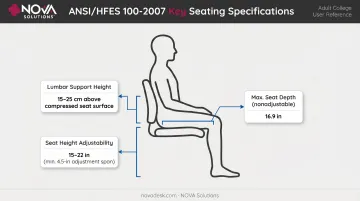
- Task chairs with lumbar support — for seminar rooms and labs where students sit for extended periods; ANSI/HFES 100-2007 specifies lumbar support height of 15–25 cm (5.9–9.8 inches) above compressed seat height
- Seat height should adjust across a range of at least 4.5 inches, spanning roughly 15–22 inches to cover adult users at different heights
- Nonadjustable seat depth should be no greater than 16.9 inches, allowing shorter users to sit with back support without knee pressure
- Active seating options — wobble stools and saddle stools for students who focus better with some movement
Adult body proportions differ from K-12 specifications in meaningful ways. Chairs spec'd for secondary school students are often too narrow, too shallow, and too low for adult users — especially for students at the taller or heavier end of the range.
Modular and Collaborative Tables
For active learning classrooms, mobility is the feature. Nesting tables on casters allow an instructor to reconfigure the room from lecture rows to group clusters in a few minutes — which is the difference between a classroom that supports collaborative pedagogy and one that just talks about it.
Collaboration tables in Keystone, D-Top, or boat configurations support:
- Small group work (clusters of 3–4)
- U-shape arrangements for discussion-based formats
- Paired configurations for partner work
NOVA Solutions' nesting multi-purpose tables are available in multiple configurations (rectangular, square, round, quarter-round) with caster options and T-leg, C-leg, or arched leg styles. The horizontal nesting design minimizes stored footprint while keeping tables immediately accessible for quick rearrangement.
The modular approach justifies the investment over fixed furniture: one classroom serves multiple course formats without room-type scheduling conflicts.
Instructor and Presenter Furniture
Instructor ergonomics tend to be an afterthought in classroom furniture planning — but professors who stand and present for 75–90 minutes accumulate their own musculoskeletal load.
Sit/stand lecterns reduce fatigue and maintain engagement by making it easy to alternate positions without interrupting instruction. NOVA Solutions' sit/stand AV lecterns adjust electrically from 30" to 42", with a 550 lb lift capacity that accommodates AV equipment, laptops, and room control systems simultaneously.
The Prestige model extends the range to 44". Both include iMod™ wire management with integrated power strips and dedicated AV rack space.
ADA Compliance and Inclusive Design in College Classrooms
The Legal Framework
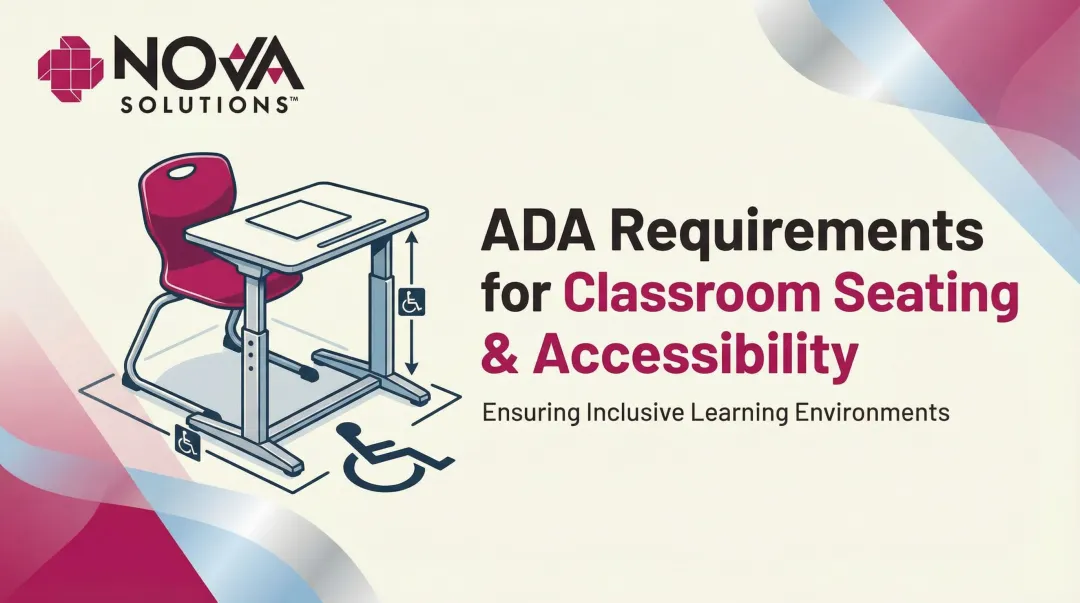
Under ADA Title II (28 CFR Part 35) and Section 504 of the Rehabilitation Act (34 CFR Part 104), colleges receiving federal financial assistance must ensure accessible learning environments. The requirements apply to physical spaces — including furniture — not just building infrastructure.
The specific ADA dimensional standards most relevant to classroom furniture procurement:
| Requirement | Standard |
|---|---|
| Accessible work surface height | 28" minimum to 34" maximum above finished floor (Section 902.3) |
| Percentage of work surfaces required to comply | At least 5% where surfaces are provided for non-employees (Section 226.1) |
| Dispersion requirement | Accessible surfaces must be dispersed throughout the space — not isolated (Section 226.2) |
| Clear floor space | 30" × 48" minimum (Section 305.3) |
| Knee clearance | 11" minimum depth at 9" above floor, 8" minimum at 27" above floor, 30" minimum width (Section 306.3) |
| Toe clearance | 17" minimum depth, 30" minimum width (Section 306.2) |
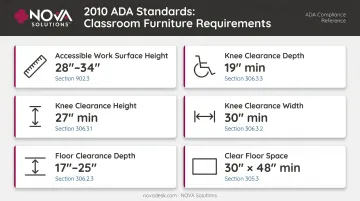
The dispersion requirement is where many institutions fall short. A single wheelchair-accessible position at the back corner of a classroom doesn't satisfy the standard — accessible seating must be integrated into the room plan so students with disabilities have equivalent choices, not just assigned seats.
Beyond Minimum Compliance
Furniture that meets ADA minimums but nothing else tends to be isolating by design: visibly different, positioned separately, a signal that accessibility was an afterthought. Universal design takes a different approach. Adjustable features, stable bases, smooth mechanisms, and appropriate sizing benefit everyone — students with temporary injuries, larger body frames, or different learning styles included.
Applying that philosophy in practice means building compliance into the product from the start, not retrofitting it. NOVA Solutions' computer training desks are available at 32" ADA-compliant height with knee and toe clearance that meets 2010 ADA Standards: 11" minimum knee depth at 9" above floor, 17" minimum toe clearance depth, and 30" minimum width throughout.
These dimensions are standard across the product line, not a separate accommodation variant ordered on request.
For public universities and community colleges working through GSA contract GS-28F-005GA, NOVA's ADA-compliant products are available at pre-negotiated pricing without a separate compliance vetting process.
Technology-Integrated Ergonomic Furniture for Modern Campuses
Why Power and Cable Management Are Ergonomic Issues
EDUCAUSE's 2018 undergraduate study reported that 98% of students used laptops in at least one course, and 94% rated laptops very or extremely important. Power outlet access ranked second only to Wi-Fi as a priority in students' study environments.
Furniture that lacks built-in power access forces students to run cords across floors (a documented trip hazard) or stretch to reach distant outlets — both of which create the kind of awkward, sustained postures that ergonomic furniture is supposed to prevent.
What to Look For in Technology-Integrated Furniture
Essential features:
- Integrated power outlets and USB charging ports in or near the work surface
- Dedicated wire management channels that route cords internally, not across the floor
- Modesty panels (laminate or perforated metal) that allow equipment access without exposing cables
For dedicated computer labs:
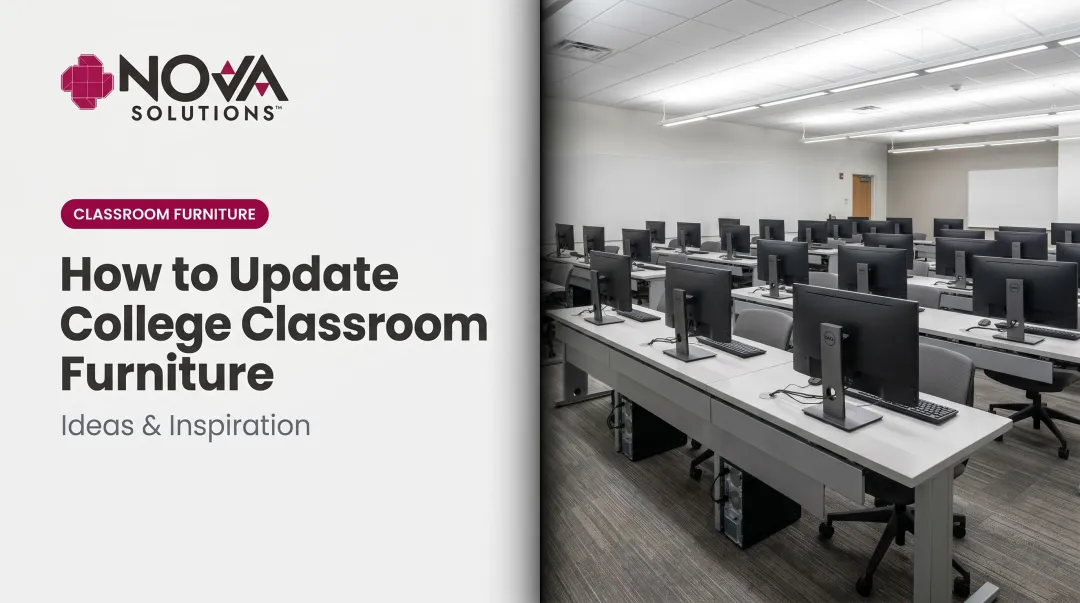
- Monitor systems that keep screens accessible without obstructing sightlines
- Sufficient surface area for both the monitor interface and peripheral work
NOVA Solutions builds these criteria directly into its product line. Here's how each system addresses the core requirements:
| System | How It Works | Best For |
|---|---|---|
| iMod™ Wire Management | Rear compartment with multi-plug power strip and dedicated cable channel per user; cables route internally from the work surface, with removable modesty panels for IT access | Computer training desks, collaboration tables, AV lecterns |
| Downview™ Display | Recesses monitors below the work surface under tinted tempered glass, supporting a natural downward viewing angle while keeping the instructor-student sightline open | Computer labs where instruction visibility matters (noted by Delgado Community College); accommodates most VESA-mountable monitors up to 24" |
| Trolley™ Monitor Lift | Motorized system raises monitors to working height and lowers them flat when not in use; optional NOVALinked™ networking lets instructors control all monitors in the room simultaneously | Flexible classrooms where the same space is used with and without computers |
How to Evaluate and Procure Ergonomic Classroom Furniture
Evaluation Criteria
Before issuing specifications, procurement teams should establish minimum thresholds for:
- Weight capacity — confirm ratings cover the full adult user range; for motorized sit/stand products, specify lift capacity for both the user and any equipment
- Adjustability range — document minimum and maximum heights in specifications; ANSI/HFES 100-2007 provides dimensional benchmarks for reference
- ADA compliance — confirm knee clearance, toe clearance, and work surface heights match 2010 ADA Standards; request documentation
- Durability — request ANSI/BIFMA X5.1 compliance for seating and X5.5 for desks/tables; both standards apply to high-traffic institutional use
- Indoor air quality — GREENGUARD Gold certification sets the benchmark for VOC emissions in educational environments
- Surface cleanability — a practical requirement for furniture shared across multiple class sections daily
A Phased Procurement Approach
Full campus rollouts based on catalog selection alone carry real risk. A better approach:
- Pilot 1–2 classrooms with new ergonomic furniture across different formats (one seminar room, one lab)
- Collect structured feedback from both students and instructors after 4–6 weeks
- Refine specifications based on actual use — seat height preferences, surface area needs, reconfiguration frequency
- Scale procurement with confidence that the specifications reflect real conditions
This reduces the risk of a costly full-campus purchase that doesn't perform as expected in practice.
Once the pilot validates your specifications, the purchasing process itself can move quickly through existing contract vehicles.
Procurement Pathway Options
Public universities and community colleges have contract options that simplify the purchasing process:
GSA Contract GS-28F-005GA (NOVA Solutions): covers computer training desks, AV lecterns, collaboration tables, multi-purpose tables, study carrels, and related furniture at 61.71% off list price; delivery 50 days ARO; maximum order $250,000.
Note: GSA Cooperative Purchasing eligibility depends on the specific Schedule category and SIN — verify eligibility before assuming blanket access.
State cooperative contracts: NOVA Solutions holds state contracts including California CMAS, New York State Contract PC70250 (with tiered discounts up to 65% on large orders), Arkansas State Contract, and PEPPM National Contract — providing compliant procurement pathways for institutions in those states without full competitive bid processes.
Products ship fully assembled from NOVA's Effingham, Illinois facility. That eliminates on-site assembly coordination and compresses deployment timelines for institutions managing installations across multiple classrooms at once.
Frequently Asked Questions
What is the difference between ergonomic furniture and standard classroom furniture?
Ergonomic furniture is designed to support the body's natural posture through adjustable height, lumbar support, and appropriate seat dimensions for adult users. Standard classroom furniture uses fixed dimensions that may not fit the range of people using them, leading to sustained awkward postures and the discomfort and distraction that follow.
Are colleges legally required to provide ADA-accessible seating in classrooms?
Yes. Under ADA Title II and Section 504, at least 5% of work surfaces in a learning space must meet ADA dimensional standards, and accessible positions must be dispersed throughout the room — not consolidated in a single location. The governing reference is the 2010 ADA Standards for Accessible Design.
How do adjustable-height desks benefit college students specifically?
College class sessions typically run 75–90 minutes or longer — long enough for uninterrupted sitting to cause real fatigue and lost focus. Height-adjustable desks let students shift between sitting and standing positions during class, reducing fatigue and helping maintain focus without leaving their seat.
Can ergonomic furniture work effectively in large college lecture halls?
Fixed-row lecture halls present real constraints, but tablet-arm chairs with lumbar support, wider seat pans, and appropriate seat depth still meaningfully improve ergonomics over standard options. Distributing accessible positions throughout the rows — rather than isolating them at the ends — also satisfies ADA dispersion requirements in constrained configurations.
What certifications should colleges look for when purchasing classroom furniture?
Look for these benchmarks when evaluating any purchase:
- ADA compliance — dimensional standards for accessible work surfaces and clearances
- ANSI/BIFMA X5.1 and X5.5 — structural safety for seating and desks/tables
- GREENGUARD Gold — low VOC emissions for indoor air quality in educational settings
- GSA listing — confirms the furniture has passed federal procurement vetting
How does technology-integrated furniture improve the college classroom experience?
Built-in power access and wire management eliminate cord clutter and the awkward reaching postures that come with stretched extension cords. For instructors, integrated AV support in sit/stand lecterns cuts setup time and accommodates varied course formats without added infrastructure.