Introduction
A gaming room used to mean a TV on a folding table and a bean bag chair in the corner. That's changed. According to the Entertainment Software Association's 2025 report, 83% of U.S. households used at least one video game device in the past year — and the average player is 36 years old, not a teenager. Gaming setups now sit alongside home offices and living rooms as real, functional spaces that people invest in deliberately.
The difference between a frustrating setup and a great one isn't the hardware. It's the desk depth, the chair support, how cables are routed, and whether the room actually works for the type of gaming happening in it.
Getting those details right is what this guide is built around. It covers 26 specific gaming room setup ideas organized across four categories: workstation and tech-focused, style and theme-driven, social and multiplayer, and small space or budget builds. Before the setups, there's a breakdown of the essential furniture pieces every setup depends on — regardless of budget or style.
Key Takeaways
- Every gaming room needs five things: a proper desk, an ergonomic chair, smart storage, controlled lighting, and cable management.
- These 26 setups cover four categories: solo workstations, themed builds, multiplayer rooms, and small-space solutions.
- Match your furniture to your activity: PC gaming, console co-op, streaming, and party rooms each need a different layout.
- Most setups overlook three things: monitor distance, seating adjustability, and cable routing.
Essential Gaming Room Furniture Pieces
Gaming Desk
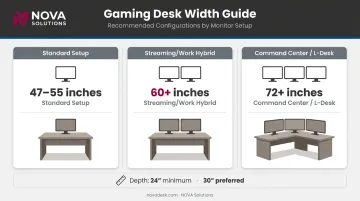
Desk size drives almost every other decision in the room. OSHA ergonomic guidelines specify a preferred monitor viewing distance of 20 to 40 inches, which means your desk depth needs to physically allow that clearance — a minimum of 24 inches, ideally 30 inches for gaming with a keyboard in front.
Width depends on your monitor count:
- Single monitor: 47–55 inches works
- Dual monitors: Plan for at least 60 inches
- Triple monitors or streaming: 72+ inches, or an L-shaped corner configuration
For institutional multi-screen setups — university esports programs being a prime example — purpose-built desks like NOVA Solutions' eSports Gaming Desks are worth knowing about. Used in facilities such as Keiser University's esports program, they're available in widths from 36" to 60" with a 30" depth, integrated wire management channels, and surface grommets. The optional slide-out PC shelf clears the surface for dual or triple monitor configurations.
Ergonomic Gaming Chair
A 2023 study of competitive gamers found 86.2% had at least one musculoskeletal injury, with 63.8% reporting lower-back pain. Most played 4–6 hours daily. The chair is not optional equipment.
What to evaluate:
- Lumbar support that follows the natural curve of the spine (OSHA's standard)
- Adjustable armrests so forearms rest without raising your shoulders
- Seat height and depth adjustment to match desk height
- Backrest tilt for posture variation during long sessions
Gaming chairs and ergonomic office chairs can both work — what matters is adjustability, not the label on the box.
Storage and Shelving
Clutter creates friction. Good storage keeps the room functional and makes the layout look intentional — both matter.
Three storage formats to know:
- Open display shelving — consoles, collectibles, and visual gear
- Closed cabinets — accessories, games, and anything that doesn't need to be seen
- Floating wall shelves — maximizes floor space, ideal for compact rooms
Media Console or TV Stand
Console setups need a media unit that anchors the room and keeps the display at the right height. Keep the screen center at approximately seated eye level — not mounted high on the wall like a bar TV.
Ventilation matters: Sony requires the PS5 to sit at least 10 cm from walls, and Xbox support specifies 4–6 inches of clearance on all sides. Enclosed cabinets trap heat, so any media unit housing a console needs open-back or vented bays.
Supplemental Seating for Social Setups
Rooms used for multiplayer or family gaming need seating that can shift configurations. Options by use case:
- Sectional sofas — best for fixed co-op setups facing a large screen
- Recliners — great for solo console sessions
- Bean bags and floor cushions — flexible for party games and overflow guests
26 Awesome Gaming Room Setup Ideas
The 26 setups below are organized across four categories — workstation/tech-focused, style and theme-driven, social/multiplayer, and small space/budget. Most setups benefit from combining elements across categories.
Workstation and Tech-Focused Setups (1–7)
Setups 1–2: Triple-Monitor Command Center and Streamer Hybrid
Setup 1 — Triple-Monitor Command Center: Wide rectangular or L-shaped desk (72"+), three displays in landscape orientation, monitor arms to free up surface space, and a mesh-back task chair. The monitor arm setup is what makes this work — without arms, three displays eat the entire desk depth.
Setup 2 — Streamer/Content Creator Hybrid: Add a secondary screen for chat and stream management, a microphone arm, ring light, and acoustic panels behind the chair. The desk has to handle gear weight and look clean on camera at the same time. Surface depth of at least 30 inches is non-negotiable.
Setups 3–4: Sit-Stand Workstation and Wire-Free Build
Setup 3 — Ergonomic Sit-Stand Workstation: The defining feature is a motorized height-adjustable desk, paired with an anti-fatigue mat and monitor arms calibrated for both seated and standing eye levels. This one works best for gamers who mix long sessions with movement breaks.
Setup 4 — Wire-Free Cable-Managed Setup: Desk with integrated grommets and cable channels, underdesk cable trays, and wireless peripherals. The payoff isn't just aesthetic — loose cables on the floor are a genuine trip hazard. CDC/NIOSH guidance applies here: keep walkways clear of cords and wires.
Setups 5–7: Dual-Purpose Desk, Entertainment Center, and Esports Training Station
Setup 5 — Dual-Purpose Gaming/Work Desk: One surface handles both professional work and gaming. A monitor arm lets the screen serve both purposes. Look for keyboard trays and side storage to keep the transition between modes quick.
Setup 6 — Console-Centered Entertainment Center: Large media unit anchoring a 65"+ display, surround sound, vented console storage, and a sectional sofa at the right distance. For a 65" display, RTINGS recommends roughly 8 feet 10 inches for mixed-use viewing — keep that in mind when placing furniture.
Setup 7 — Esports Training Station: Built for team play, this layout arranges multiple desks side-by-side or in a U configuration. Key elements include:
- Matching chairs and uniform screen heights across all stations
- Shared cable management to avoid cross-desk clutter
- Four to six identical stations for home or school setups
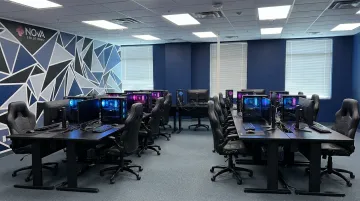
Real esports labs scale much further — Ohio State's arena launched with roughly 80 computers, consoles, and VR systems — but consistent peripherals matter at any size.
Style and Theme-Driven Setups (8–14)
Setups 8–10: RGB Arcade, Retro Cabinets, and Sci-Fi Command Deck
Setup 8 — RGB Neon Arcade-Style Room: LED strips behind the desk, under shelves, and along the room perimeter. Bold wall color or gaming wallpaper. A neon sign accent. The difference between chaotic and designed comes down to zones — each light source should have a defined purpose and position.
Setup 9 — Retro Arcade Cabinet Room: Two or three full-size cabinets as statement pieces, paired with modern seating and vintage signage. Let the cabinets carry the visual weight — surrounding furniture should stay clean so nothing competes with them.
Setup 10 — Sci-Fi/Futuristic Theme Room: Metallic desk finishes, blue or white LED underlighting, wall-mounted monitors, and zero clutter. Inspired by the command-deck aesthetic of games like Halo — restraint is what makes it feel intentional rather than unfinished.
Setups 11–14: Monochrome, Dark Battlestation, Brand-Loyal, and Cozy
Each of these four setups takes a different position on the style spectrum:
- Minimalist Monochrome (Setup 11): Black or white palette throughout — desk, chair, shelving, walls. Hardware becomes the visual focus; no decor competes for attention.
- Dark Moody Battlestation (Setup 12): Dark walls, charcoal desk, amber or deep red underlighting, blackout curtains. Go for quality over quantity with accent lighting — a single well-placed strip beats six mediocre ones.
- Brand-Loyal Themed Room (Setup 13): Furniture and decor coordinated around a platform — Xbox green and black, PlayStation blue and white, Nintendo red. Branded accessories and posters pull it together without expensive custom pieces.
- Cozy Cottage Gamer Aesthetic (Setup 14): Warm wood desk, soft upholstered chair, Edison bulbs, earthy palette. Built for players who want a relaxed atmosphere — a deliberate counterpoint to RGB maximalism.
Social and Multi-Player Setups (15–20)
Setups 15–16: Couch Co-Op and Projector Party Room
Setup 15 — Big-Screen Console Couch Co-Op: Large sectional or two-piece sofa facing a 75"+ display. Coffee table for controllers. Surround sound or a quality soundbar. For a 75" display, RTINGS puts the mixed-use sweet spot at around 10 feet 2 inches — measure before buying the sofa.
Setup 16 — Party Game Room with Projector: Projector and pull-down screen (or a painted accent wall) replacing the TV. Folding chairs or floor cushions for flexible seating. Designed for groups of six or more covering party games, sports events, and movie nights. For large groups, a projector scales far better than any TV.
Setups 17–20: Board Game Hybrid, Rec Room, Family Den, and LAN Party
Setup 17 — Board Game + Video Game Hybrid Room: Round dining-height table for board games with storage underneath; gaming station on one wall. The two activities need dedicated zones so neither crowds out the other.
Setup 18 — Pool/Foosball + Gaming Combo Rec Room: A pool table or foosball table anchoring the center, gaming station on one wall. Floor planning is critical. According to Brunswick Billiards, a 7-foot pool table requires a minimum room of 13 ft x 16 ft with a standard 58" cue — account for that clearance before committing to furniture placement.
Setup 19 — Family Gaming Den: Multi-use space designed for both kids and adults. Prioritize:
- Age-appropriate seating at varied heights
- Storage that handles multiple console types
- Easy-clean surfaces and durable fabrics
When different ages share the space, adaptability outlasts any single design choice.
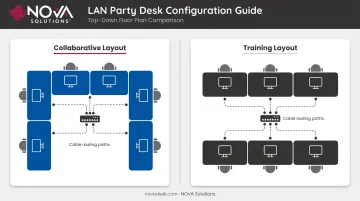
Setup 20 — LAN Party-Ready Multi-PC Setup: Four to six matching desks in a U or parallel configuration, shared networking infrastructure, matching chairs, uniform cable management. For institutional eSports labs or training facilities scaling this format, NOVA Solutions' eSports Gaming Desks offer identical configurations with built-in grommets and ADA-compliant dimensions — keeping multi-station setups organized and accessible.
Small Space and Budget-Friendly Setups (21–26)
Setups 21–22: Under-Stairs Nook and Bedroom Corner
Setup 21 — Under-Stairs Gaming Nook: Compact desk fitted into the triangular space under a staircase. Wall-mounted monitor to save depth. Floating shelves above for accessories. LED strips along the ceiling edge prevent the space from feeling like a cave.
Setup 22 — Bedroom Gaming Corner: Compact 40–48" desk against one wall, monitor arm to reclaim surface space, pegboard or wall shelf above for the headset and controllers. Visually separating the gaming zone from the sleep zone — even just with a rug or a curtain — makes a real difference in how restful the room feels.
Setups 23–26: Closet Conversion, Floating Shelf Wall, KALLAX Build, and Basement Conversion
Setup 23 — Closet-to-Gaming-Station Conversion: Remove the doors, paint the interior a dark accent color, install a floating shelf as the desk surface, add under-shelf lighting. Few changes reclaim as much usable square footage per dollar — dead storage becomes a dedicated nook.
Setup 24 — Floating Shelf Wall Setup: No traditional desk required. Wall-mounted shelves hold the display, consoles, and decor, leaving the floor footprint nearly zero — the right call when every square foot counts.
Setup 25 — Budget IKEA KALLAX System Build: KALLAX shelving as the primary storage and display unit, paired with a simple tabletop-and-leg desk. The 4-cube KALLAX is currently $44.99 and the 8-cube is $79.99 — prices that make it easy to keep a full setup under $400 in total furniture costs.
Setup 26 — Garage or Basement Conversion: Repurposing underused space for a dedicated gaming room. Key furniture decisions: moisture-resistant flooring, durable work surfaces, and proper ventilation. Basements offer natural sound dampening — a real bonus for audio-intensive setups and late-night sessions.
Here's a quick comparison of all six setups:
| Setup | Best For | Approximate Furniture Cost |
|---|---|---|
| Under-Stairs Nook | Homes with unused stair space | $150–$400 |
| Bedroom Corner | Limited rooms, dual-use spaces | $100–$350 |
| Closet Conversion | Small homes, renters | $50–$200 |
| Floating Shelf Wall | Minimalists, tiny rooms | $75–$250 |
| KALLAX System Build | Budget-conscious builders | Under $400 |
| Garage/Basement | Dedicated room, more space | $500–$1,500+ |
Designing for Your Space Type
Room dimensions determine which furniture formats work. A simple rule of thumb:
| Room Size | Best Approach |
|---|---|
| Under 100 sq ft | Floating shelves, compact desk, wall-mounted display |
| 100–200 sq ft | Full desk-and-storage combo, secondary seating possible |
| 200+ sq ft / converted space | Multiple activity zones, full workstation configurations |
Sketch a floor plan before buying anything. Use masking tape on the floor to map furniture footprints — the most common reason a gaming room fails is poor spatial planning, not budget.
Cable management and ventilation matter regardless of room size. Loose cables across the floor are a genuine trip hazard — desks with built-in grommets or underdesk routing channels eliminate the problem before it starts.
Airflow is equally non-negotiable. For consoles and PCs, maintain 4–6 inches of clearance on all sides and never house them in fully enclosed cabinets.
Once airflow and cable routing are sorted, consider how the room will be used beyond gaming. If it doubles as a home office, the desk needs to handle both roles without requiring a full teardown between them. Monitor arms and adjustable-height surfaces give you flexibility without needing two separate setups.
Lighting, Decor, and Atmosphere
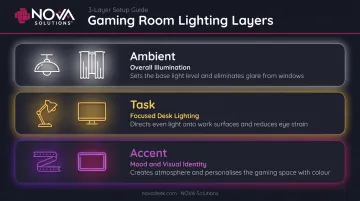
Every gaming room runs on three lighting layers:
- Ambient — Overall room illumination. Blackout curtains prevent glare during day sessions. Overhead fluorescent lighting creates the worst possible combination of glare and eye strain — avoid it.
- Task — Direct lighting at the desk to prevent eye strain during non-immersive work. CCOHS notes that appropriate lighting without glare or shadows reduces eye fatigue and headaches.
- Accent — RGB strips, neon signs, and underglow lighting that set mood and visual identity.
Once the lighting plan is set, decor follows the same logic — furniture layout comes first, then decor fills the space around it. Pieces worth considering:
- Themed wall art or posters
- Floating controller mounts (functional and visual)
- Acoustic panels that double as decorative wall treatment
- Area rugs that define zones and reduce echo
How to Choose the Right Gaming Room Furniture
Common Buying Mistakes
- Buying a gaming chair for looks without checking lumbar adjustability
- Choosing a desk too narrow for the planned monitor count
- Ignoring storage until after the room is already assembled — then realizing there's nowhere to put anything
Function first, style second.
Practical Evaluation Checklist
Before buying any piece, run through these:
- Desk depth: Minimum 24 inches; 30 inches preferred for gaming
- Monitor distance: Does the desk depth allow 20–40 inches of eye-to-screen clearance?
- Chair height range: Does it match your desk when properly adjusted?
- Storage capacity: Does it actually fit your current equipment, with room to grow?
- Material durability: High-use gaming furniture needs surfaces that handle daily friction
Conclusion
A great gaming room is built on the right furniture foundation — desk, chair, storage, and seating — before any decor decisions get made. The 26 setups in this guide cover every style, space type, and budget, and the consistent thread across all of them is that thoughtful furniture placement matters more than how much you spend.
Start with the desk and chair. Build outward from there.
For esports programs, school gaming labs, or any multi-station environment where performance and cable management need to be built into the furniture itself, NOVA Solutions' eSports Gaming Desks are worth a close look. ADA-compliant configurations, integrated wire management, and widths up to 60 inches accommodate dual and triple monitor setups — purpose-built for environments where the furniture has to work as hard as the hardware. Request a quote at novadesk.com.
Frequently Asked Questions
What should every gaming room have?
A dedicated desk with adequate depth, an ergonomic chair with adjustable lumbar support, sufficient storage to eliminate clutter, controlled lighting that prevents glare, and reliable cable management. These five elements apply regardless of budget or room size.
What are popular gaming room trends right now?
Clean cable-managed battlestations dominate current builds, along with dual-purpose gaming/work setups and cozy aesthetic rooms that use warm tones and soft lighting instead of wall-to-wall RGB. Modular storage that displays gear as decor is also increasingly common.
What size desk is best for a gaming setup?
A single-monitor setup works on a 47–55" desk, while dual-monitor or streaming setups need at least 60" of width. Depth matters just as much: aim for at least 24 inches, with 30 inches as the preferred standard for healthy monitor-to-eye distance.
How do I keep cables organized in a gaming room?
Use desks with built-in grommets or raceways, add underdesk cable trays, and bundle cables with velcro ties. Wall-mounted cable channels handle runs between stations. Switching to wireless peripherals eliminates the majority of desktop cable clutter at the source.
Can a small room be turned into a gaming room?
Yes. Wall-mounted displays, floating shelves, compact corner desks, and vertical storage that uses wall height rather than floor area can turn almost any space into a functional gaming room. Under-stairs nooks and closet conversions are two of the most effective small-space solutions.
What is the difference between a gaming chair and a regular office chair?
Gaming chairs typically feature bucket-seat styling, detachable lumbar and neck pillows, and a wider recline range. Ergonomic office chairs often provide superior long-session support through adjustable lumbar curves and seat depth settings. For sessions over four hours, prioritize a chair with adjustable lumbar support and seat depth over brand category or styling.