This guide walks through the full process — from space assessment and procurement strategy through layout, infrastructure, and common setup failures — with specific benchmarks drawn from current higher education standards.
Key Takeaways
- Plan space at 30–35 sq ft per seat as a baseline, then add for accessibility, specialty equipment, and circulation
- Hardware and furniture are interdependent: specify both together, not sequentially
- ADA requires at least 5% of workstations to be accessible, integrated into the main lab layout
- Network and power infrastructure must be scoped before equipment arrives, not after
- Purpose-built technology furniture — with integrated wire management, ADA-compliant dimensions, and modular configurations — prevents the most common and costly setup failures
Planning Your University Computer Lab
Planning is where most lab projects get into trouble — not during installation. Decisions made here about capacity, use cases, and compliance directly constrain every downstream choice. Rushing this phase means expensive course corrections later.
Assess Space, Capacity, and Use Cases
Start with the physical room's reality before specifying anything. Key factors to evaluate:
- Square footage and column placement — columns constrain row alignment and reduce usable density
- Natural light and HVAC proximity — both affect monitor glare and equipment operating temperatures
- Existing power and data infrastructure — determines how much electrical and network work the project requires
For space planning, university facilities standards consistently point to 30–35 sq ft per person for general computer labs. Specialized labs — CAD, engineering, digital media — typically require 50 sq ft per station due to larger workstations and additional peripheral equipment.
Use case analysis shapes every other decision. A lab serving general computing looks nothing like one supporting software engineering, digital media production, or proctored testing. Survey intended users before specifying hardware or furniture. Specifically, identify:
- Peak concurrent user demand (not total enrolled population — this is the number that determines seat count)
- Software requirements by discipline, which drive hardware specifications
- Supervised vs. open access configurations, which affect layout and furniture type
Budget and Procurement Planning
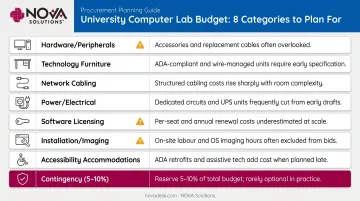
Budget early and budget broadly — most lab projects underestimate at least one of these categories:
| Category | Notes / Watch-outs |
|---|---|
| Hardware and peripherals | Varies significantly by use case |
| Technology-integrated furniture | Often budgeted as generic office furniture |
| Network cabling and switching | Scope creep from undocumented existing infrastructure |
| Power/electrical work | Dedicated circuits, surge protection, UPS |
| Software licensing | Multi-seat agreements needed before hardware arrives |
| Installation and imaging | Labor costs frequently omitted |
| Accessibility accommodations | Added as afterthought, not original scope |
| Contingency | Institutional guidance typically runs 5–10% of total project cost |
For procurement, universities with government purchasing channels have real advantages. GSA's Multiple Award Schedule allows eligible public universities to access pre-negotiated pricing on IT equipment and compliant furniture. Cooperative contracts through Sourcewell, E&I, and state-specific programs offer similar benefits.
For furniture specifically, NOVA Solutions holds an active GSA contract (GS-28F-005GA) plus state contracts in California, Alabama, Arkansas, Louisiana, New York, and others. University procurement offices get multiple contract pathways with predictable pricing and no separate competitive bid required.
Choosing Equipment and Technology-Integrated Furniture
Hardware and furniture are interdependent choices. Specifying workstation hardware without knowing the desk footprint — or selecting furniture before finalizing monitor size and mount type — creates rework. Treat these as one decision, not two sequential ones.
Hardware, Peripherals, and Software
Hardware specifications should split by use case. Current university benchmarks show wide variation:
| Use Case | Typical Specification |
|---|---|
| General academic computing | Ultra 7-class CPU, 16GB RAM, 512GB SSD |
| Computer science / development | Intel i9 or Apple M-series, 16GB–32GB RAM, 1TB SSD |
| AI, data science, cyber | Core i9/Ryzen 9, 32GB RAM, dedicated GPU |
| High-end research workstation | Threadripper PRO, 128GB ECC RAM, Nvidia RTX A4000 |
For deployment model, the choice between full desktops and thin clients or VDI depends on the lab's primary function. VDI centralizes image management and software access — useful for large labs with standardized software needs. Full desktops handle local GPU requirements, specialty peripherals, and offline resilience better.
Cloud-based and virtual desktop environments carry significantly higher bandwidth requirements: Microsoft RDP estimates range from 100–150 Kbps for basic productivity up to 8.5 Mbps for full-screen video per user.
Accessible workstations require dedicated peripherals — budget for these alongside standard hardware:
- Screen readers and magnification software (JAWS, ZoomText, Fusion)
- Adjustable monitor positioning
- Braille keyboards or key labels
- Alternative input devices (trackballs, switch access)
- Headphone and microphone support
Software licensing must be procured before hardware arrives — deploying machines without licensed software delays lab opening. Microsoft's Enrollment for Education Solutions (EES) covers institutions with 1,000+ users; concurrent licensing models managed centrally work well for less frequently used specialty applications.
Furniture Built for Technology Integration
Once hardware decisions are locked, furniture selection follows directly from them. Standard office furniture fails in computer lab environments for three predictable reasons: exposed cabling creates trip hazards, clutter reduces usable workspace, and non-adjustable heights exclude users with disabilities.
Purpose-built technology furniture solves these problems by design rather than afterthought. Features that matter in a lab environment:
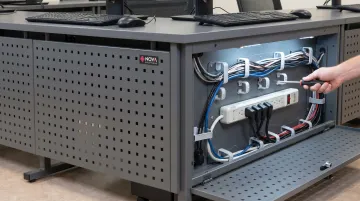
- Integrated wire management — NOVA Solutions' iMod™ system routes cables through a dedicated compartment on the backside of each desk, with a multi-plug power strip and wire management channel per user. A removable modesty panel (laminate or perforated metal) keeps everything concealed while allowing IT staff easy access for maintenance or reconfiguration.
- Monitor integration options — NOVA's Downview™ system recesses the monitor below a tinted tempered glass viewport, supporting monitors up to 24" widescreen and freeing the entire work surface. The Trolley™ Monitor Lift raises and lowers monitors electrically with Intelligent Motion Technology™, adding vandalism protection in open-access labs.
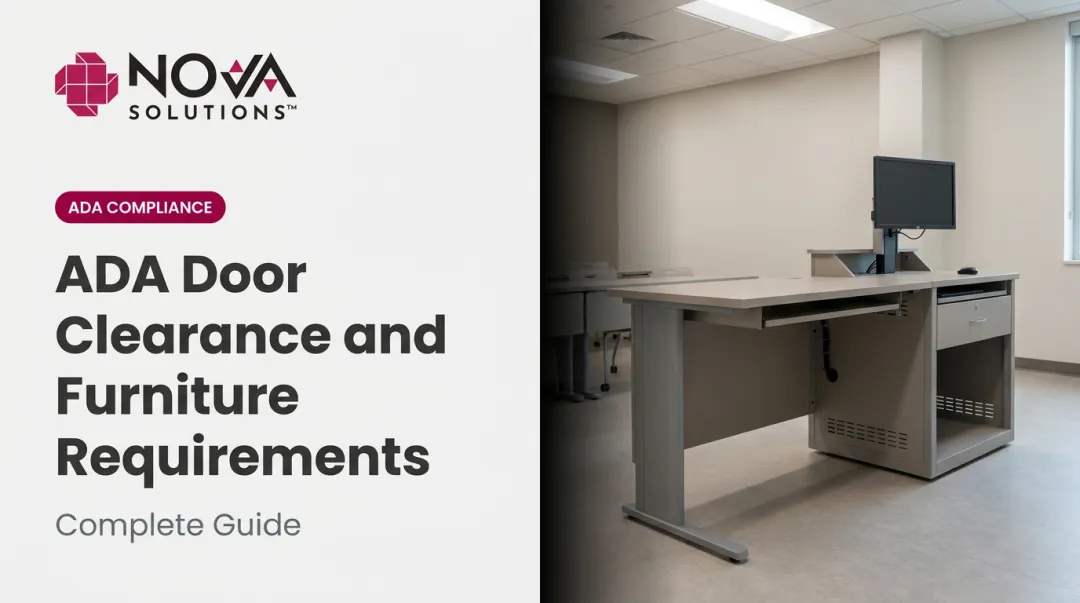
- ADA-compliant height options — NOVA's computer training desks ship in standard 30" height or 32" ADA-compliant height, with knee clearance dimensions meeting current ADA Standards: 30" wide minimum, 9–27" above finished floor.
- Institutional-grade surfaces — high-pressure laminate with 2mm PVC edge banding, available in 10 finishes with UL certification for flame spread and smoke development.
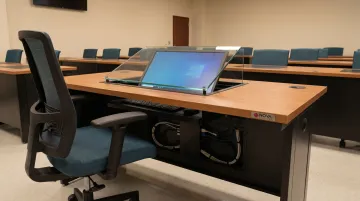
NOVA ships all products fully assembled — a practical advantage for university-scale installations where on-site assembly time adds up quickly across dozens or hundreds of units.
Designing for Accessibility and Optimal Layout
Layout decisions affect student focus, instructor oversight, ADA compliance, and how the space adapts over time. Getting layout wrong is expensive to reverse after furniture is installed.
Layout Configurations for Different Lab Types
Three configurations cover most university lab needs:
Traditional row seating — workstations face the same direction in parallel rows. Best for proctored testing, independent coursework, and maximum density. Limits collaboration; instructor must walk rows to assist students.
Perimeter layout — workstations line the walls with an open center. Works well for mixed-use labs where discussion and peer collaboration happen alongside individual work. Reduces total seat count compared to rows.
Pod or cluster layout — groups of 4–6 stations arranged to face each other. Best for collaborative project work, coding pairs, and active learning. Requires more square footage per seat but supports peer-to-peer interaction.
Sightline planning matters regardless of layout. Instructors and proctors need clear visibility to all screens for both teaching effectiveness and academic integrity. NOVA's Teacher Stand-Up Desks — available at 40" height — give instructors elevated sightlines across the room without requiring a raised platform. These stations share the same iMod™ wire management and Trolley™ or Downview™ display options as student units, which simplifies procurement and keeps cable management consistent across the room.
ADA Accessibility Requirements
ADA Standards Section 226.1 requires at least 5% of work surfaces provided for public or student use to comply with accessibility requirements, and Section 226.2 requires these stations to be dispersed throughout the space — not clustered in one corner.
Key dimensional requirements:
| Requirement | Specification |
|---|---|
| Work surface height | 28–34 inches above finished floor |
| Clear floor space | 30 x 48 inches |
| Knee clearance width | 30 inches minimum |
| Aisle width | 36 inches minimum accessible route |
| Forward/side reach | 15–48 inches above floor |
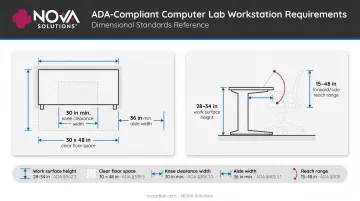
Accessible workstations should integrate into the main lab flow. Clustering them in a separate area or a less convenient location violates both the spirit and the letter of the ADA's dispersion requirement. Under Section 504, federally funded institutions cannot discriminate on the basis of disability — accessible design is a compliance obligation, not a design preference.
Networking, Infrastructure, and Power Setup
Network and power infrastructure is the invisible foundation of any computer lab. Get it wrong and you're dealing with slowdowns, outages, and expensive retrofits. Plan it correctly upfront — with realistic growth margins built in — and the lab handles the next hardware generation without major changes.
Network Design and Connectivity
Core networking decisions:
- Wired vs. Wi-Fi: For labs with fixed workstations, wired Ethernet per station is more reliable. Pasadena City College's cabling standard specifies one drop per computer as a baseline; UConn's 2025 telecommunications standard calls for Cat 6 UTP on horizontal runs, with Cat 6A at high-capacity and wireless access point locations.
- Switch capacity: Size port counts for current stations plus 10–20% planned growth. Undersizing here forces a full switch replacement sooner than expected.
- VLAN segmentation: Separate VLANs for student stations, instructor stations, printers, and management traffic. Harvard's network guidance notes that minimal segmentation lets attackers reach many systems after a single compromise — a real risk in high-turnover lab environments.
- Bandwidth planning: Model from the heaviest concurrent workload, not average usage. A 30-station lab running web-based applications simultaneously can easily hit 200+ Mbps aggregate demand.
Power Planning and Cable Management
Power planning basics:
- Calculate dedicated circuit needs by workstation type, monitor count, and peripheral load — have an electrical engineer run this calculation, not IT
- Specify surge protection at each station; UPS at the infrastructure level to bridge power gaps before emergency backup activates
- Plan cable routing early: underfloor raceways, overhead trays, or furniture-integrated channels each have different cost and maintenance profiles
OSHA 29 CFR 1910.22 requires walking-working surfaces to be free of hazards — exposed cables are a documented compliance risk, not an aesthetic preference.
Furniture with integrated cable management, like NOVA Solutions' iMod™ system, routes power and data cables through dedicated internal channels. That eliminates floor-level hazards and makes hardware changes faster and cleaner when the next refresh cycle arrives.
Common Setup Challenges and How to Overcome Them
Common Challenge 1: Budget Overruns Mid-Project
Problem: Costs escalate when hardware, furniture, and infrastructure are procured as separate line items without a unified project budget. Electrical work and accessibility retrofits are the most frequent surprise additions.
Fix:
- Build one budget covering all categories before any purchasing begins
- Use GSA or cooperative contract pricing to lock in predictable costs on both hardware and furniture
- Carry a 5–10% contingency line based on institutional capital project norms
Common Challenge 2: Inadequate ADA Compliance
Problem: Labs are designed to maximum capacity first, with accessible workstations added as an afterthought — often failing clearance requirements or placed in inconvenient locations.
Fix:
- Design accessible workstations into the initial floor plan before any other stations are placed
- Specify ADA-compliant furniture (correct height, knee clearance, clear floor space) in the original purchase order
- Have the layout reviewed against current ADA Standards before installation begins — not after
Common Challenge 3: Cable and Wire Management Failures
Problem: Cabling is run without a management strategy. The result: tangled exposed wires that create hazards, complicate maintenance, and make hardware upgrades unnecessarily difficult.
Fix:
- Specify furniture with integrated cable management at the furniture selection stage — not as an add-on
- Route all power and data cabling through dedicated pathways (furniture channels, floor boxes, or cable trays)
- Document the cable plan so future IT staff can maintain or reconfigure the lab without guesswork
Pro Tips for a Future-Ready Lab
Avoiding the three challenges above is reactive. These habits keep you ahead of them:
- Refresh cycles: Design furniture and infrastructure to accommodate next-generation equipment, not just current specs. NOVA's iMod™ system, retrofit kits, and modular accessories (Trolley™ Monitor Lift, Downview™, surface mount arms, pop-up power centers) allow technology upgrades without replacing furniture.
- Full documentation: Keep floor plans, network diagrams, cable routes, equipment serial numbers, and furniture specifications in a single accessible file. Future IT staff should be able to manage, expand, or audit the lab without reverse-engineering the existing setup.
- Written orders with a layout drawing: For university-scale furniture orders, NOVA requires written orders accompanied by a layout drawing — catching configuration errors before manufacturing begins.
Frequently Asked Questions
Do colleges still have computer labs?
Yes. Labs remain essential for students who need specialized software, high-performance hardware, proctored testing, or workstations they can't afford on their own. EdTech reported in 2022 that 8% of college students lack a personal device and 36% face inadequate internet access at some point during their studies.
What do students do in the computer lab?
Common uses include coursework and research, specialized software (CAD, video editing, coding environments), proctored exams, printing and scanning, and group project work — tasks personal laptops often can't handle due to hardware limits or licensing restrictions.
How many computers should a university computer lab have?
Base seat count on peak concurrent demand, not total enrollment. There's no universal national ratio — plan from actual course schedules, utilization data, and software demand. ADA Standards require at least 5% of stations to be accessible; use that as a minimum, not a ceiling, for accessible workstation count.
What is the best layout for a university computer lab?
It depends on primary use. Row layouts work best for testing and independent work. Pod layouts support collaborative learning and group projects. Perimeter layouts suit mixed-use environments with both individual and discussion-based activity. Factor instructor sightlines and 36-inch ADA aisle clearances into any configuration before finalizing the floor plan.
How do you make a computer lab ADA compliant?
Key requirements: work surface height at 28–34 inches, 30 x 48 inch clear floor space, knee clearance 30 inches wide at specified depths, and 36-inch accessible route aisles. Distribute accessible stations throughout the main lab rather than clustering them separately. Purpose-built ADA-compliant furniture from manufacturers like NOVA Solutions meets these dimensions without custom retrofitting.
What equipment is essential for a university computer lab?
Core categories: workstation computers (desktop or thin client), monitors, keyboards and mice, network switches and structured cabling, UPS and surge protection, printers, and technology-integrated furniture with built-in wire management. Furniture is often underestimated as infrastructure, but cable hazards, fixed heights, and undersized desks directly affect both performance and compliance.